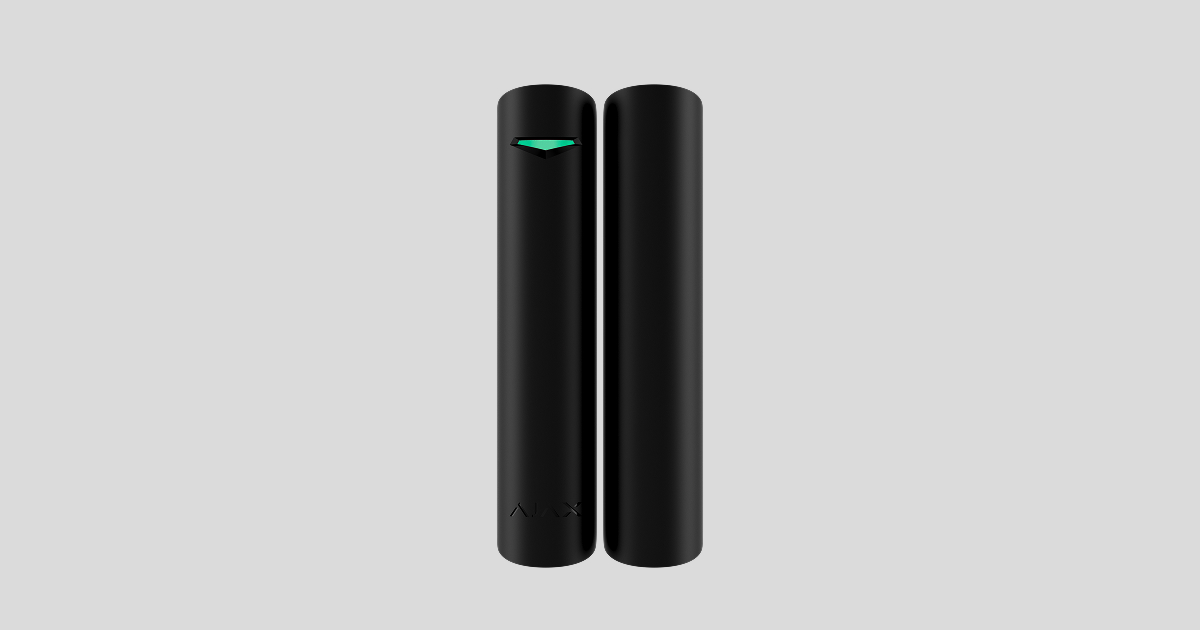
Superior DoorProtect G3 Jeweller is a wireless reed-switch opening detector with shock, tilt, and masking sensors. It supports the connection of a third-party wired detector with a normally closed (NC) contact. The device is designed for indoor use only.
The detector operates in an Ajax system and exchanges data with the hub via the secure Jeweller and Wings radio protocols.
Superior DoorProtect G3 Jeweller is a device of the Superior product line. Only accredited Ajax Systems partners can sell, install, and administer Superior products.
Functional elements
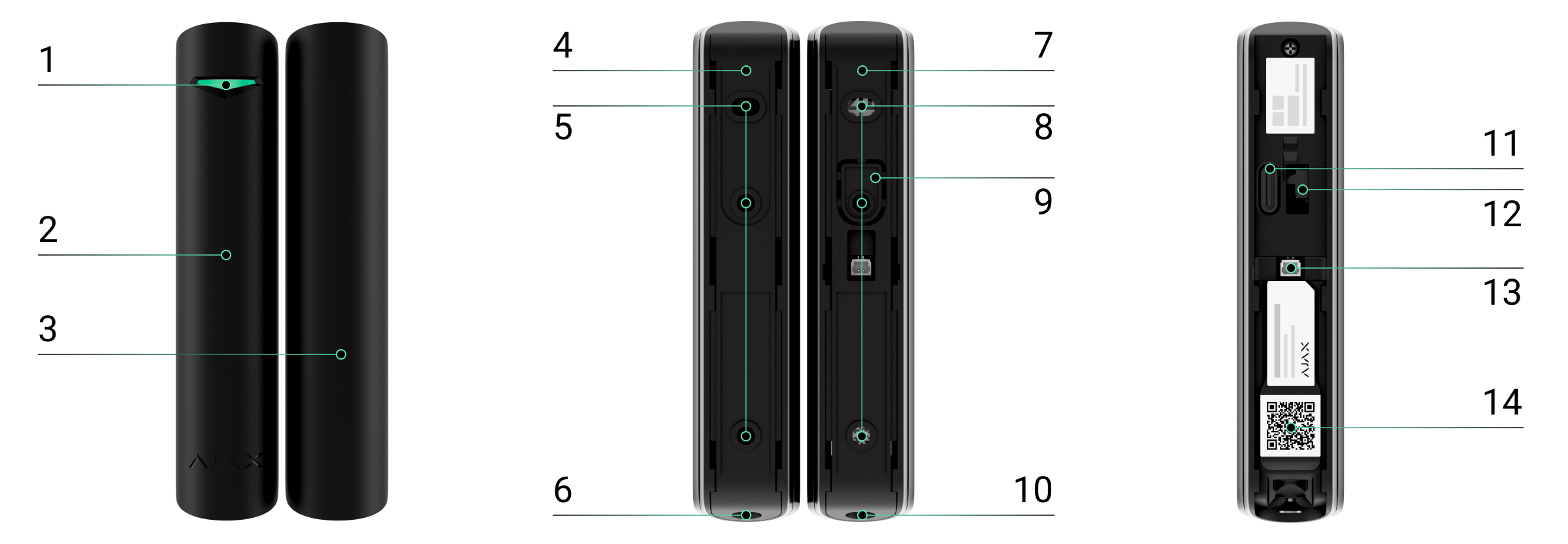
- LED indicator.
- Superior DoorProtect G3 Jeweller detector.
- Magnet.
- SmartBracket mounting panel for the magnet. To remove the panel, unscrew the holding screw.
- Holes to attach the magnet’s SmartBracket to the surface.
- Holding screw to secure the magnet on SmartBracket.
- SmartBracket mounting panel for the detector. To remove the panel, unscrew the holding screw.
- Holes to attach the detector’s SmartBracket to the surface.
- Perforated part of the mounting panel. It triggers a tamper button in case of any attempt to detach the device from the surface. Do not break it off.
- Holding screw to secure the detector on SmartBracket.
- Power button.
- Tamper button.
- Connector for a third-party wired device.
- QR code with the device ID. It is used to add the device to the hub.
Compatible hubs
The device requires an Ajax hub with OS Malevich 2.35 and later versions.
Operating principle
Superior DoorProtect G3 Jeweller is a wireless reed-switch opening detector with shock, tilt, and masking sensors. The device consists of two parts. The first part is the detector with two reed switches, the magnetic masking, shock, and tilt sensors. The second part is the magnet needed to detect opening. All detector sensors work independently. Each sensor can be enabled or disabled in Ajax apps.
Opening is detected by the reed switch built into the detector and the magnet. When the magnet approaches the reed switch or moves away from it, the reed switch changes the contact state and notifies users of opening or closing.

Superior DoorProtect G3 Jeweller has two reed switches. This allows the magnet to be installed on either the left or right side of the detector. The device operates correctly if one magnet is installed only on one side. If magnets are installed on both sides, Superior DoorProtect G3 Jeweller cannot detect opening correctly.
The shock sensor detects attempts to break a window or door and responds to vibration when an intruder tries to break a lock or a door.
The tilt sensor detects the deviation of the detector from the initial position. Before the system is armed, the sensor remembers the initial position and is triggered if the deviation is more than the set angle (depending on the settings). This allows you to protect windows, including skylights, and arm the system when the window is in ventilation mode. You just need to disable the main detector in the settings in advance.
If the armed device detects opening or closing of a door or window, a shock, or angle changes, it instantly sends an alarm to the hub. The hub activates the sirens added to the system, runs the scenarios, and notifies users and the security company of the incident. All detector alarms and events are recorded in the event feed in Ajax apps.
The detector does not switch to armed mode instantly. The switching time depends on the exit delay (specified in the detector settings) and the detector polling interval. The polling interval is set in Jeweller settings; its default value is 36 seconds. In the first case, the delay is set by a user or PRO with admin rights. In the second case, the delay occurs because the hub takes one polling interval to notify the detector of the security mode change.
Magnetic masking protection
The device detects an attempt to mask the main magnet of Superior DoorProtect G3 Jeweller with a fraudulent magnet. The built-in sensor compares the current magnetic field value with the value recorded during calibration and identifies differences. If the differences are detected, users and the central monitoring station (CMS) receive a masking notification. The system allows users to select when the device detects magnetic masking: always or only when the detector is armed.
The masking sensor should be calibrated immediately after installation or whenever the installation location is changed.
Superior Jeweller data transfer protocol
Superior Jeweller is an upgraded radio protocol for Superior devices, ensuring compliance with EN 50131 (Grade 3). It features advanced encryption and frequency hopping. Full frequency hopping is available only when all devices in the system use Superior Jeweller. If at least one device operates via the regular Jeweller protocol, the system will be limited to Grade 2: encryption remains, but frequency hopping is disabled. Superior devices can also operate using the regular Jeweller protocol, depending on the hub.
Wings data transfer protocol
Wings is a proprietary wireless communication technology for transmitting large data packets. The device uses Wings to upload firmware updates.
Advanced encrypted communication
Communication between Superior DoorProtect G3 Jeweller and the hub is protected by an advanced encryption scheme that ensures data confidentiality and integrity. This means that all sensitive data in the message is encrypted, and each message includes a unique authentication tag allowing the system to verify that the data has not been modified during transmission. The system can reliably detect tampering and reject forged or altered messages, providing robust protection against both passive and active attacks. This ensures secure communication between the device and the hub, as well as reliable system and data protection.
Frequency hopping
To comply with the Grade 3 requirements, Superior DoorProtect G3 Jeweller uses frequency hopping for radio communication with the hub (or the radio signal range extender). With this method, the hub and devices added to it change their operating frequency according to a defined pattern. The hopping sequence covers a defined set of channels within the operating bands, and the devices switch frequencies synchronously with the hub. Even if some channels are affected by jamming, messages can be transmitted successfully via other channels. Frequency hopping improves the system’s reliability and performance and ensures its resistance to intentional interference and jamming attempts.
Frequency hopping does not cause delays or pauses during radio communication and does not reduce the data transfer speed. If range extenders are added to the system, frequency hopping is used for all radio communications: “device ↔ range extender” and “range extender ↔ hub”.

The system uses frequency hopping for radio communication only if all wireless devices support this method.
If at least one device added to the system does not support frequency hopping, the hub and all devices switch to the operating frequencies of that device and do not use frequency hopping for radio communication.
Firmware update
If a new firmware version for Superior DoorProtect G3 Jeweller is available, the  icon appears in Ajax apps in the Devices
  tab. An admin or a PRO with access to the system settings can run an update via device states or settings. The on-screen instructions help to update the firmware successfully.
Sending events to the monitoring station
An Ajax system can transmit alarms to the Ajax PRO Desktop monitoring app and the central monitoring station (CMS) in the formats of SurGard (Contact ID), SIA (DC-09), ADEMCO 685, and other protocols.
Superior DoorProtect G3 Jeweller can transmit the following events:
- Opening sensor (reed switch) alarm/recovery.
- Opening sensor (reed switch) malfunction/recovery.
- Accelerometer malfunction/recovery.
- Magnetic masking sensor malfunction/recovery.
- Masking with a fraudulent magnet and recovery.
- Alarm/recovery of a third-party detector with NC contact.
- Tamper alarm. Tamper button recovery.
- Loss and restoration of connection with the hub.
- Permanent deactivation/activation of the device.
- One-time deactivation/activation of the device.
When an alarm is received, a CMS operator knows what happened and precisely where to dispatch a rapid response unit. The addressability of Ajax devices allows sending events to Ajax PRO Desktop or the CMS with the type of the device, its name, security group, and virtual room specified. The list of transmitted parameters may vary depending on the CMS type and the selected communication protocol.
You can find the device ID, loop (zone) number, and line number in the device states.
Selecting the installation site
When choosing a location for installing Superior DoorProtect G3 Jeweller, consider the parameters that affect its operation:
You must consider the placement recommendations when designing the system for the facility. Only specialists can design and install an Ajax system. A list of recommended partners is available here.
Installation recommendations
The positioning of the magnet relative to the sensor depends on the installation location and the surface material.
Installation on metal surfaces
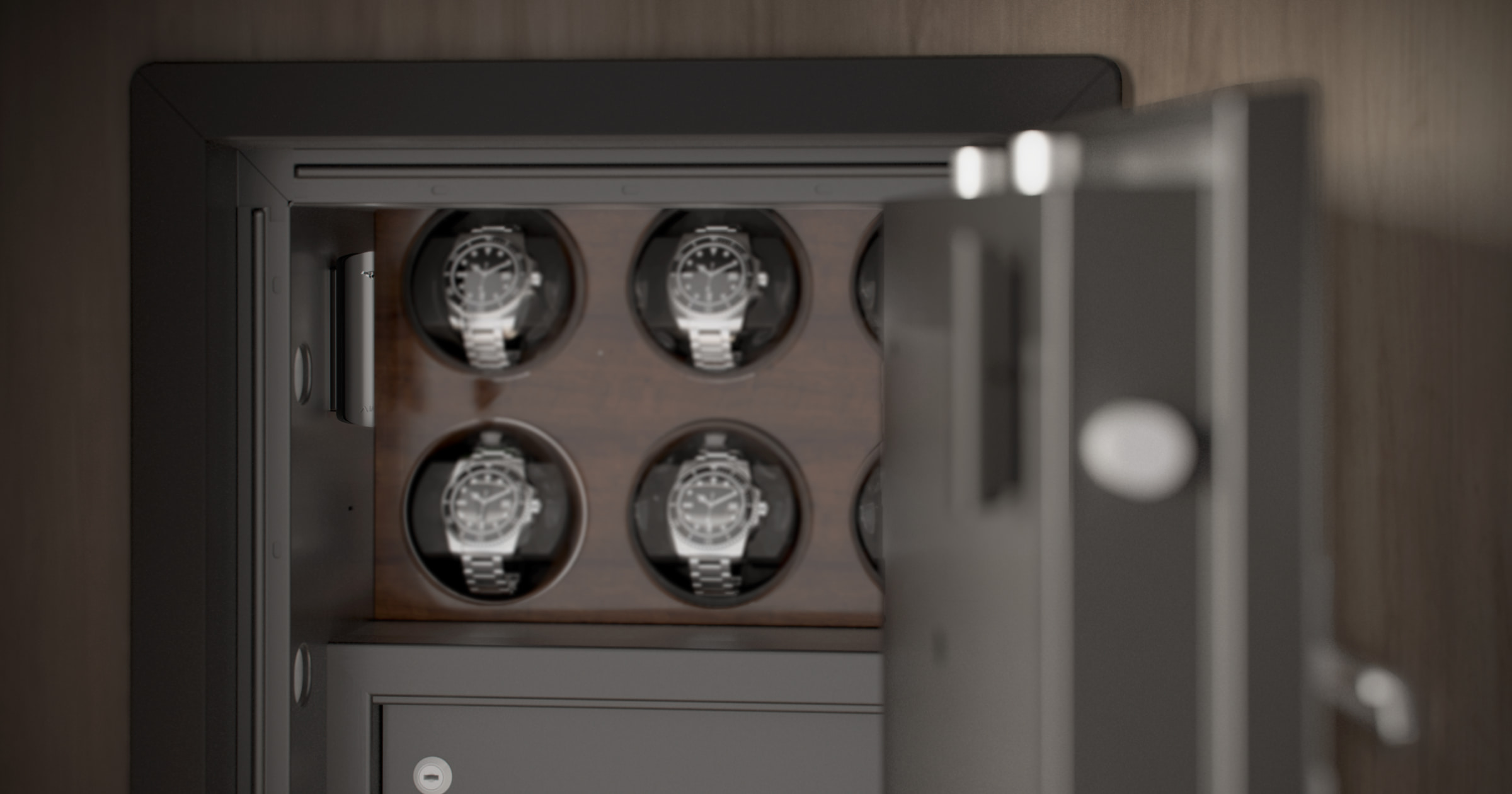
If the detector is installed on a metal surface (e.g., in a safe):
- The distance between the detector and the magnet must not exceed 0.19 inch.
- The distance between the detector and a third-party electromagnet (e.g., a magnetic door lock) must be greater than 2 inches.
Installation on non-metallic surfaces
If the detector is installed on a non-metallic surface (e.g., on a plastic window or wooden door):
- The distance between the detector and the magnet must not exceed 0.39 inch.
- The distance between the detector and a third-party electromagnet (e.g., a magnetic door lock) must be greater than 2 inches.
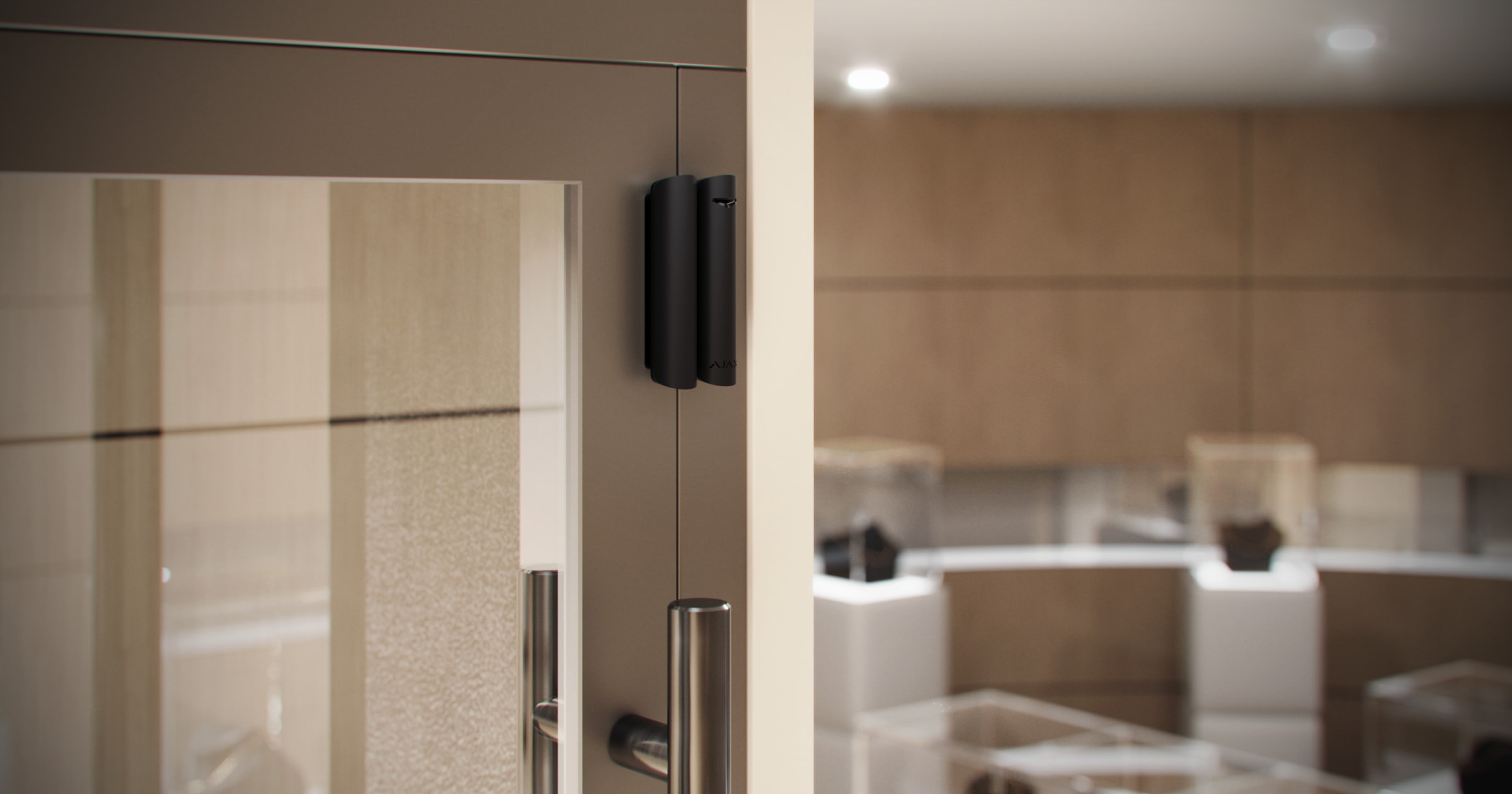
Superior DoorProtect G3 Jeweller can be installed on sliding systems and roller shutters. If the magnet slides over the detector for a long time during closing/opening, false alarms may occur. To avoid this, disable the magnetic masking detection option.
Superior DoorProtect G3 Jeweller working distances
Relatively to the detector, the magnet can move along three axes: X (X1), Y, or Z. This depends on the Superior DoorProtect G3 Jeweller installation location. For example:
- X-axis (or X1): on the roller shutter.
- Y-axis: on the sliding door.
- Z-axis: on the window.
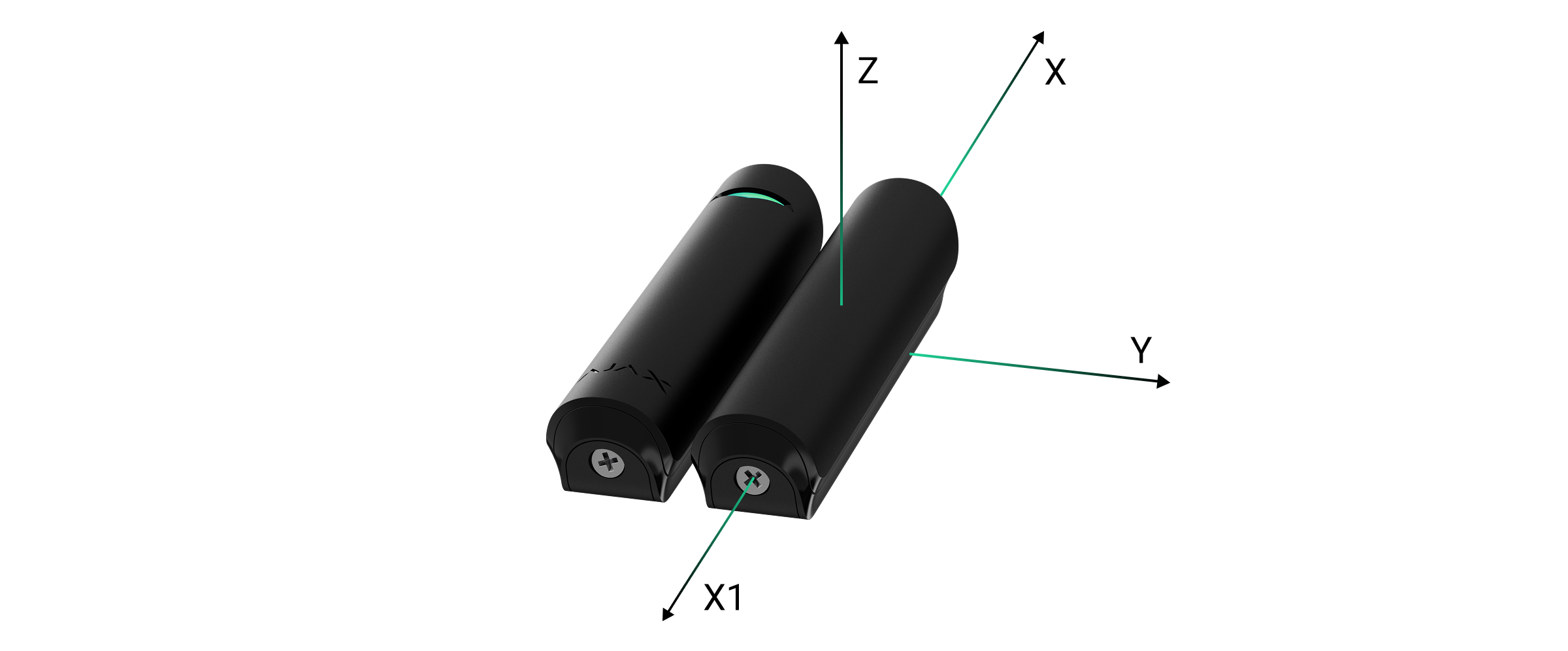
| Axis |
Magnet on non-ferromagnetic surfaces (e.g., wooden doors) |
Magnet on ferromagnetic surfaces (e.g., metal doors) |
||||||
| Removal distance, inches | Approach distance, inches | Removal distance, inches | Approach distance, inches | |||||
| Left | Right | Left | Right | Left | Right | Left | Right | |
| X | 3.03 | 2.72 | 2.76 | 2.48 | 2.09 | 2.09 | 1.73 | 1.93 |
| X1 | 2.95 | 3.31 | 2.68 | 2.95 | 1.93 | 1.65 | 1.57 | 1.54 |
| Y | 1.50 | 1.38 | 1.34 | 1.18 | 0.94 | 0.71 | 0.79 | 0.63 |
| Z | 1.97 | 1.89 | 1.73 | 1.61 | 0.79 | 0.75 | 0.59 | 0.59 |
Do not exceed the maximum permissible distance between the detector and the magnet. This may cause false alarms or detector malfunction: the detector will not respond to closing/opening of the door or window.
If the window has tilt mode, the detector should be installed at the top of the window to avoid false alarms. When the window is opened for ventilation, the detector gets closer to its magnet and thus may perceive this as an attempt to mask the magnet.
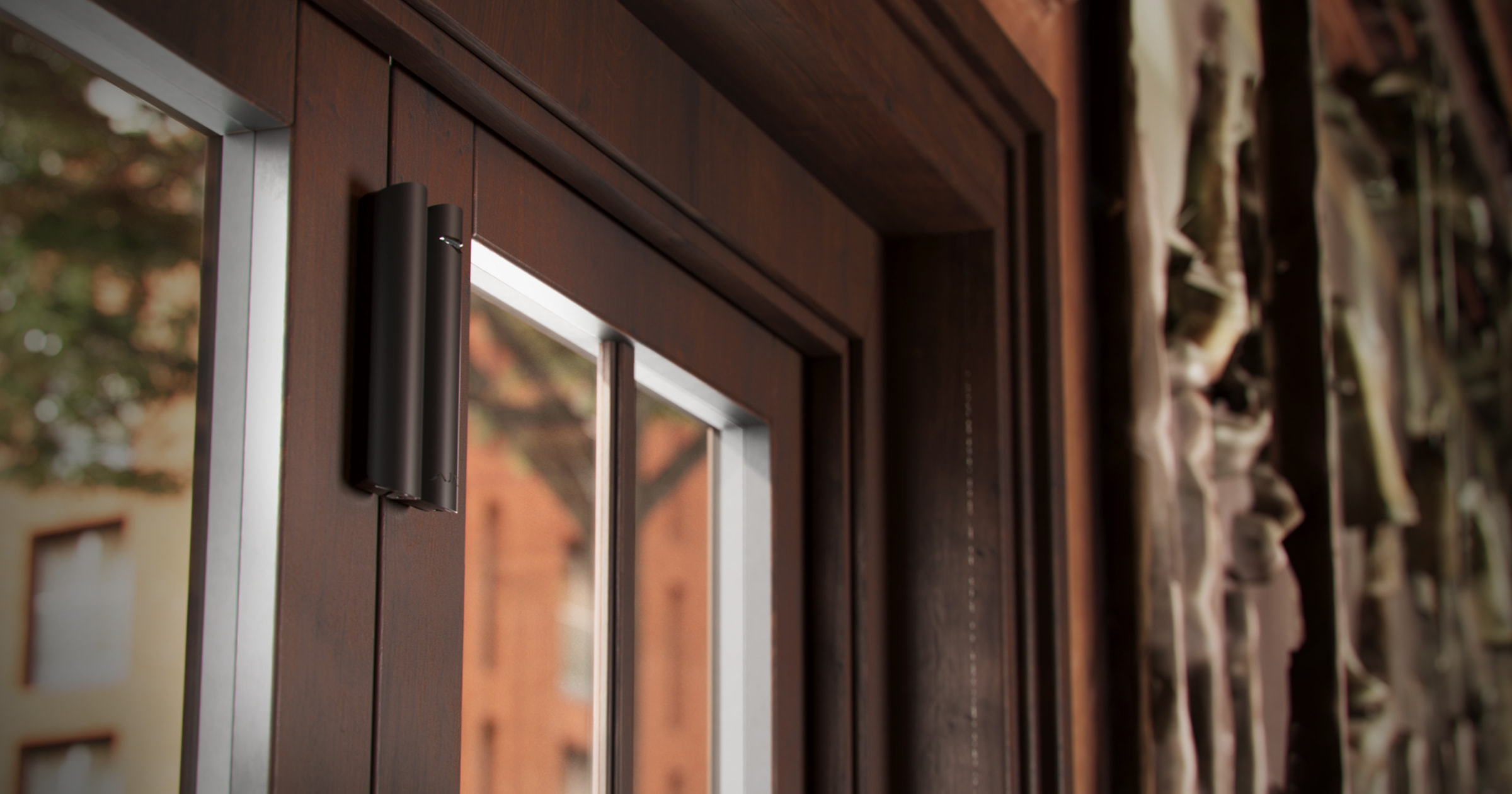
If you want to use only the shock and/or tilt sensor, you do not need to install the magnet near the detector. You can disable the opening and the magnetic masking sensors in the Superior DoorProtect G3 Jeweller settings.
Signal strength
The signal strength is determined by the number of undelivered or corrupted data packages over a certain period. The  icon in the Devices tab in Ajax apps indicates the signal strength:
- three bars — excellent signal strength.
- two bars — good signal strength.
- one bar — low signal strength, stable operation is not guaranteed.
- crossed-out icon — signal is missing.
Check the Jeweller and Wings signal strength before final installation. With a signal strength of one or zero bars, we do not guarantee the device will operate stably. Consider relocating the device, as adjusting its position even by 8 inches can significantly improve the signal strength. If the signal remains poor or unstable after relocation, consider using a radio signal range extender.
Refer to the Functionality testing section to learn how to run the Jeweller and Wings signal strength test.
Detection zone
When installing the detector, perform the Detection zone test. This allows you to check the operation of the device and ensure that the detector responds correctly to opening and closing of the door or window, shocks, and angle changes.
Where not to install the detector
- Outdoors. This can lead to false alarms and detector failure.
- With a magnet installed at a distance that does not comply with the recommendations. This can result in false alarms or detector malfunction: the detector will not respond to closing/opening of the door or window.
- In premises with temperature and humidity beyond the permissible limits. This can damage the device.
- In places with low or unstable Jeweller or Wings signal strength.
- Near other magnets. This can lead to false alarms due to magnetic masking detection. If the detector is installed on a door with a door closer, do not set the sensitivity level to High.
- Asymmetrically to the magnet.
Installation
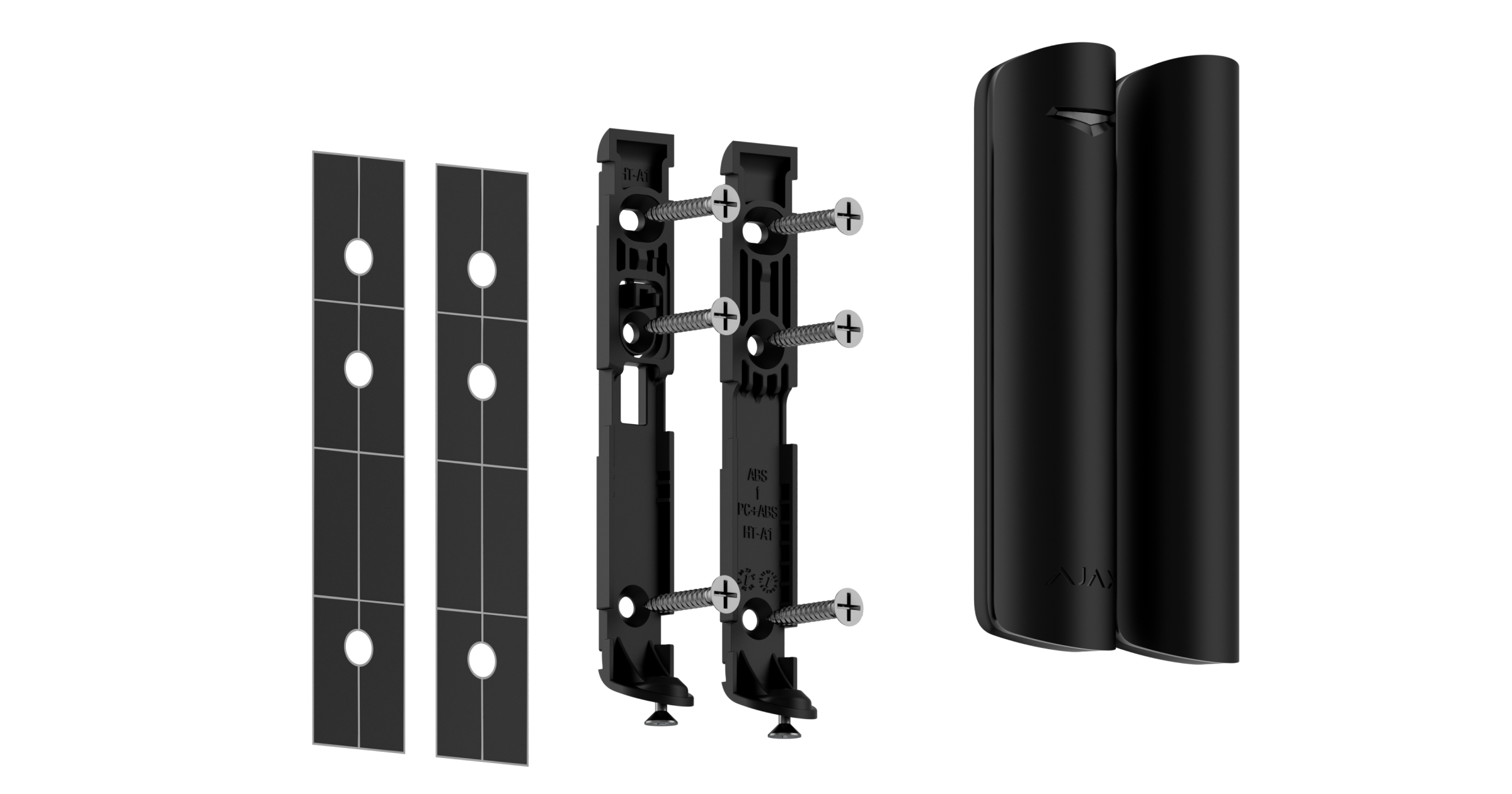
Before installing Superior DoorProtect G3 Jeweller, ensure that you choose the optimal location that complies with the manual requirements.
To install the device:
- Unscrew the holding screws at the bottom of the detector and the magnet. Then, remove the SmartBracket mounting panels from the detector and the magnet.
- Add the device to the system.
- Temporarily secure the detector’s and magnet’s SmartBracket panels using double-sided adhesive tape or other temporary fasteners.
Double-sided adhesive tape should only be used for temporary installation. The device attached with the tape can come unstuck at any time. As long as the device is attached with the double-sided adhesive tape, the tamper button is not triggered when the device is detached from the surface.
- Place the detector and the magnet on their SmartBracket mounting panels. The detector LED indicator will start flashing to indicate that the detector enclosure is closed.
- Run the functionality testing.
- If the tests are passed, remove the detector and the magnet from their SmartBracket panels.
- Fix SmartBracket panels on the surface with the bundled screws. Use all fixing points.
If you use other fasteners, ensure they do not damage or deform the panels.
- Place the detector and the magnet on their SmartBracket mounting panels.
- Tighten the holding screws on the bottom of the detector’s and magnet’s enclosure. The screws are needed for more reliable fastening and protection from quick dismantling.
Connecting a third-party wired detector
You can connect a wired device with NC contact to Superior DoorProtect G3 Jeweller.
Superior DoorProtect G3 Jeweller does not power a third-party detector. It should be connected separately. For the type and voltage of the third-party detector, refer to its documentation or contact the manufacturer’s support service.
Install a third-party detector at a distance of no greater than 3 feet from Superior DoorProtect G3 Jeweller. Increasing the wire length degrades the quality of communication between devices.
To connect a third-party wired detector:
- Remove the detector from the mounting panel if it has already been installed.
- If you need to route the cable from the side, carefully break out the plugs in the detector enclosure.

- Route the cable of the third-party wired detector into the Superior DoorProtect G3 Jeweller enclosure.
- Connect the wired detector to Superior DoorProtect G3 Jeweller using the bundled connector.

- Enable the External contact option in the device settings.
- Check the operation of the connected wired detector. If the external detector is triggered, you will receive a notification.
To receive alarm notifications when the roller shutter is open, connect a wired roller shutter motion detector with a normally closed contact to Superior DoorProtect G3 Jeweller.
Adding to the system
Check the device compatibility before the detector is added to the system. Only verified partners can add and configure Superior devices in Ajax PRO apps.
Before adding a device
- Install an Ajax PRO app.
- Log in to a PRO account or create a new one.
- Select a space or create a new one.
- Add at least one virtual room.
- Add a compatible hub to the space. Ensure the hub is switched on and has internet access via Ethernet, Wi-Fi, and/or mobile network.
- Check the states in the Ajax app to ensure the space is disarmed and the hub is not starting an update.
Adding to the hub
- Open an Ajax PRO app. Select a space to which you want to add the device.
- Go to the Devices tab and tap Add device.
- Assign a name to the device.
- Scan a QR code or enter the device ID manually. The QR code with the device ID is placed on the device enclosure. Also, it is duplicated on the device packaging.

- Select a virtual room and a security group (if Group mode is enabled).
- Tap Add, and the countdown will begin.
- Switch on the device by holding the power button for 3 seconds.

If the connection fails, try again in 5 seconds. If the maximum number of devices has already been added to the hub, you will receive an error notification when you try to add more.
Once added to the hub, the device will appear in the list of hub devices in the Ajax app. The update frequency for device states in the list depends on the Jeweller or Jeweller/Fibra settings and is 36 seconds by default.
Superior DoorProtect G3 Jeweller works with only one hub. When paired with a new hub, it stops sending events to the old one. Adding the detector to a new hub does not automatically remove it from the device list of the old hub. This must be done through the Ajax app.
Functionality testing
An Ajax system offers several types of tests to help select the correct installation place for the devices. For Superior DoorProtect G3 Jeweller, you can perform the following tests:
- Jeweller signal strength test — to determine the signal strength and stability between the hub (or the radio signal range extender) and the device via the wireless Jeweller data transfer protocol at the device installation site.
- Wings signal strength test — to determine the signal strength and stability between the hub (or the radio signal range extender) and the device via the wireless Wings data transfer protocol at the device installation site.
- Signal attenuation test — to decrease or increase the power of the radio transmitter; to check the stability of communication between the device and the hub, the changing environment at the site is simulated.
- Detection zone test — to check how the device detects opening and closing of a door or window, shocks, and angle changes at the installation site.
- Calibration of masking sensor — to register the magnetic field’s value at the detector’s installation site. This value will be taken as normal. Calibration is performed when the opening sensor is closed.
- Device self-test — to check if all detector’s built-in sensors operate properly.
Icons
Icons in an Ajax app display some of the Superior DoorProtect G3 Jeweller states. You can check the icons in the Devices tab.
| Icon | Meaning |
|
Jeweller signal strength. It displays the signal strength between the hub and the device. The recommended value is 2–3 bars. |
 |
Battery charge level of the device. |
|
A firmware update is available. Go to the device states or settings to find the description and launch an update. |
 |
The detector operates in the Always active mode. |
 |
The device operates via the radio signal range extender. |
 |
Exit/entry delay is enabled. |
 |
The device operates in Night mode. |
 |
The opening sensor has detected opening. The icon is displayed regardless of the security mode. |
 |
An external contact (a third-party wired detector) has detected opening. The icon is displayed regardless of the security mode. |
 |
A roller shutter detector is disconnected. |
 |
The magnetic masking is detected. |
 |
The magnetic masking sensor requires calibration. |
 |
The device is in the signal attenuation test mode. |
 |
The device is automatically disabled because the number of alarms has been exceeded. |
 |
The device is permanently deactivated. |
 |
Tamper alarm notifications are permanently deactivated. |
 |
The device is deactivated until the system is disarmed for the first time. |
 |
Tamper alarm notifications are deactivated until the system is disarmed for the first time. |
 |
The device has lost connection with the hub, or the hub has lost connection with the Ajax Cloud server. |
 |
The device has not been transferred to the new hub. |
States
The states include information about the device and its operating parameters. The states of Superior DoorProtect G3 Jeweller can be found in Ajax apps:
- Go to the Devices tab.
- Select Superior DoorProtect G3 Jeweller in the list.
| Parameter | Meaning |
| Data import | Displays the error when transferring data to the new hub:
|
| Malfunction |
Tapping on The field is only displayed if a malfunction is detected. |
| New firmware version available |
Tapping on The field is displayed if a new firmware version is available. |
| Magnetic masking sensor requires calibration |
The magnetic masking sensor needs to be calibrated. Calibration is important for the device correct operation and instant detection of an attempt to use fraudulent magnets. |
| Temperature |
Device temperature. It is measured by the processor and changes depending on the ambient temperature. You can create a scenario by temperature to control automation devices. |
| Jeweller signal strength |
Jeweller signal strength between the device and the hub (or the radio signal range extender). The recommended value is 2–3 bars. Jeweller is a protocol for transmitting events and alarms. |
| Connection via Jeweller | The state of the connection via the Jeweller channel between the device and the hub (or the range extender):
|
| Wings signal strength |
Wings signal strength between the device and the hub (or the range extender). The recommended value is 2–3 bars. Wings is a protocol for updating the device firmware. |
| Connection via Wings | Connection status via Wings channel between the device and the hub (or the range extender):
|
| <Range extender name> | The state of the device connection to the radio signal range extender.
The field is displayed if the device operates via the radio signal range extender. |
| Battery charge | The battery charge level of the device. Two states are available:
When the batteries need to be replaced, users and the security company will receive appropriate notifications. |
| Lid | The state of the device’s tamper button that responds to detachment or opening of the device enclosure:
|
| Transmitter power |
Displays the selected power of the transmitter. The parameter appears when the Max or Attenuation option is selected in the Signal attenuation test menu. |
| Opening sensor | The state of the detector’s opening sensor:
|
| External contact | The state of a third-party detector connected to Superior DoorProtect G3 Jeweller:
|
| Shock sensor | The state of the shock sensor:
|
| Tilt sensor | The state of the tilt sensor:
|
| Magnetic masking detection | The state of the magnetic masking detection option:
|
| Always active |
When this option is enabled, the detector is constantly armed, detects opening and closing of a door or window, shocks, and angle changes, and raises alarms. |
| Advanced encryption | The state of the communication with advanced encryption between the device and the hub or radio signal range extender:
|
| Permanent deactivation | The state of the device’s permanent deactivation setting:
|
| One-time deactivation | Shows the state of the device’s one-time deactivation setting:
|
| Alarm reaction | |
| Operating mode | Shows how the detector responds to alarms:
|
| Delay when entering |
Entry delay (alarm activation delay) is the time a user has to disarm the system after entering the premises. |
| Delay when leaving |
Exit delay (arming delay) is the time a user has to leave the premises after the system is armed. |
| Arm in Night mode |
If this option is enabled, the device will enter armed mode when the system is set to Night mode. |
| Night mode delay when entering |
Entry delay in Night mode. Entry delay (alarm activation delay) in Night mode is the time a user has to disable Night mode after entering the premises. |
| Night mode delay when leaving |
Exit delay in Night mode. Exit delay (arming delay) in Night mode is the time a user has to leave the premises after Night mode is enabled. |
| Night mode delay |
Entry delay in Night mode when the device is set to the Follower operating mode. It is the time a user has to disable Night mode (alarm activation delay) after the Entry/Exit detector is triggered. |
| Firmware | Device firmware version. |
| Device ID | Device ID. It is also available on the QR code on the device enclosure and its package box. |
| Device No. | Device number. This number is transmitted to the CMS in case of an alarm or event. |
 opens the list of device malfunctions.
Settings
To change Superior DoorProtect G3 Jeweller settings, in an Ajax app:
- Go to the Devices tab.
- Select Superior DoorProtect G3 Jeweller in the list.
- Go to Settings
 .
. - Set the required settings.
- Tap Back to save the new settings.
| Settings | Meaning |
| Name |
Device name. It is displayed in the list of hub devices, text of SMS and notifications in the events feed. To change the device name, tap on the text field. The name can contain up to 24 Latin characters or up to 12 Cyrillic characters. |
| Room |
Selecting the virtual room to which Superior DoorProtect G3 Jeweller is assigned. The room name is displayed in the text of SMS and notifications in the events feed. |
| Alarm LED indication | When this option is disabled, the LED indicator does not notify users of alarms and tamper button triggering. |
| Opening sensor |
When this option is enabled, the Superior DoorProtect G3 Jeweller opening sensor responds to opening and closing. When this option is disabled, the Magnetic masking detection option is not available. |
| External contact | When this option is enabled, Superior DoorProtect G3 Jeweller detects alarms of a third-party wired device connected to it. |
| Always active |
When this option is enabled, the detector is always armed. This means the detector will constantly respond to opening/shock/tilt and raise alarms regardless of the system arming mode. |
| External contact type | Selecting the type of a third-party wired device connected to the Superior DoorProtect G3 Jeweller connector:
|
| Time before alarm |
The time for which the specified number of impulses should be counted: 5 to 30 seconds. The countdown starts after the roller shutter detector connected to Superior DoorProtect G3 Jeweller sends the first impulse. This setting is displayed if the external contact type is Roller shutter. |
| Impulses before alarm |
The number of impulses from the roller shutter detector connected to Superior DoorProtect G3 Jeweller that is required to raise an alarm: 2 to 7. This setting is displayed if the external contact type is Roller shutter. |
| Shock sensor | When this option is enabled, the device detects shocks. |
| Sensitivity | The sensitivity level of the shock sensor. The choice depends on the object type, the presence of probable sources of false alarms, and the specifics of the protected area:
Before selecting the sensitivity level, perform the detection zone test. If the detector does not respond to shock in 5 out of 5 cases during the test, the sensitivity should be increased. |
| Ignore single impact | When this option is enabled, the alarm is activated only if the sensor detects more than one shock. |
| Tilt sensor | When this option is enabled, the device detects changes in the tilt angle. |
| Tilt | Selecting the angle that is enough to trigger an alarm when the detector is tilted. |
| Tilt alarm delay | The time from the moment the detector is tilted to the alarm: 1 second to 1 minute. |
| Magnetic masking detection |
When this option is enabled, the device detects the magnetic masking. This setting is displayed if the Opening sensor option is enabled. |
| Masking detection sensitivity | The sensitivity level of the magnetic masking sensor. The choice depends on the object type, the presence of probable sources of false alarms, and the specifics of the protected area:
If the detector is installed on a door with a door closer, do not set the sensitivity level to High. |
| Detect masking | Selecting when the device detects magnetic masking:
|
| Alert with siren | |
| If opening detected | If active, sirens added to the system are activated when the opening is detected. |
| If an external contact is open |
If active, sirens added to the system are activated when an external detector is triggered. This setting is displayed if the external contact type is External contact. |
| If roller shutter is triggered |
If active, sirens added to the system are activated when the roller shutter connected to Superior DoorProtect G3 Jeweller detects an alarm. This setting is displayed if the external contact type is Roller shutter. |
| If roller shutter is disconnected |
If active, sirens added to the system are activated when the roller shutter detector connected to Superior DoorProtect G3 Jeweller is disabled. This setting is displayed if the external contact type is Roller shutter. |
| If shock detected | If active, sirens added to the system are activated when Superior DoorProtect G3 Jeweller detects a shock. |
| If tilt detected | If active, sirens added to the system are activated when Superior DoorProtect G3 Jeweller detects a tilt. |
| If magnetic masking detected | If active, sirens added to the system are activated when magnetic masking is detected. |
| Chime settings |
When Chime (opening notifications) is enabled, the sirens emit a special sound to indicate that the opening detectors are triggered when the system is disarmed. |
| Alarm reaction | |
| Operating mode | Specifying how this device responds to alarms:
|
| Delay when entering |
Entry delay: 5 to 255 seconds. Entry delay (alarm activation delay) is the time a user has to disarm the system after entering the premises. |
| Delay when leaving |
Exit delay: 5 to 255 seconds. Exit delay (arming delay) is the time a user has to leave the premises after the system is armed. |
| Arm in Night mode |
When this option is enabled, the detector will enter the armed mode if the system is set to Night mode. |
| Night mode delay when entering |
Entry delay in Night mode: 5 to 255 seconds. Night mode entry delay (alarm activation delay) is the time a user has to disable Night mode after entering the premises. |
| Night mode delay when leaving |
Exit delay in Night mode: 5 to 255 seconds. Night mode exit delay (arming delay) is the time a user has to leave the premises after enabling Night mode. |
| Night mode delay |
Delay time in Night mode: 5 to 255 seconds. It is the time a user has to disable Night mode (alarm activation delay) after the Entry/Exit detector is triggered. The setting is displayed if the device is set to the Follower operating mode and the Arm in Night mode option is enabled. |
| Firmware update | Switches the device to the firmware updating mode if a new version is available. |
| Jeweller signal strength test |
Switches the device to the Jeweller signal strength test mode. The test allows you to check the signal strength between the hub (or the radio signal range extender) and the device via the wireless Jeweller data transfer protocol to select the optimal installation site. |
| Wings signal strength test |
Switches the device to the Wings signal strength test mode. The test allows you to check the signal strength between the hub (or the radio signal range extender) and the device via the wireless Wings data transfer protocol to select the optimal installation site. |
| Detection zone test |
Switches the detector to the detection zone test mode. The test enables users to check how the detector responds to the opening and closing of a door or a window, shocks, and angle changes and determine the optimal installation location. |
| Calibration of masking sensor |
Runs the masking sensor calibration to ensure the correct operation of the device and instant detection of the attempt to use fraudulent magnets. |
| Device self-test |
Runs the device self-test to check if the built-in sensors operate properly. |
| User manual | Opens the Superior DoorProtect G3 Jeweller user manual in an Ajax app. |
| Permanent deactivation |
Allows a user to disable device events without removing the device from the system. Three options are available:
The system can also automatically deactivate devices when the set number of alarms is exceeded. |
| One-time deactivation |
Allows a user to disable events of the device until the system is disarmed for the first time. Three options are available:
|
| Delete device | Unpairs the device, disconnects it from the hub, and deletes its settings. |
Setting up Chime
Chime is an audio signal that informs about the triggering of the opening detectors when the system is disarmed. The feature is used, for example, in stores to notify employees that someone has entered the premises.
The notifications are configured in two stages: setting up the sirens and setting up the opening detectors.
Сalibration of masking sensor
Calibrating the magnetic masking sensor is important for the correct operation of the device and instant detection of attempts to use fraudulent magnets. The sensor should be immediately calibrated after it is added to the system or whenever the installation location is changed.
To start calibrating the masking sensor, in an Ajax app:
- Go to the Devices tab.
- Select Superior DoorProtect G3 Jeweller in the list.
- Go to the calibration by clicking on
 in front of the Magnetic masking sensor requires calibration state.
To calibrate the sensor, ensure that the opening sensor is closed and no fraudulent magnets are nearby.
If the icon is not available, in an Ajax app:
- Go to the Devices tab.
- Select Superior DoorProtect G3 Jeweller in the list.
- Go to Settings .
- Go to the Calibration of masking sensor menu.
- Tap Start.
- If the calibration is successful, tap Close to return to the settings. If the device fails to calibrate, check if the device is installed properly and the opening sensor contact is closed. Then, tap Restart.
Device self-test
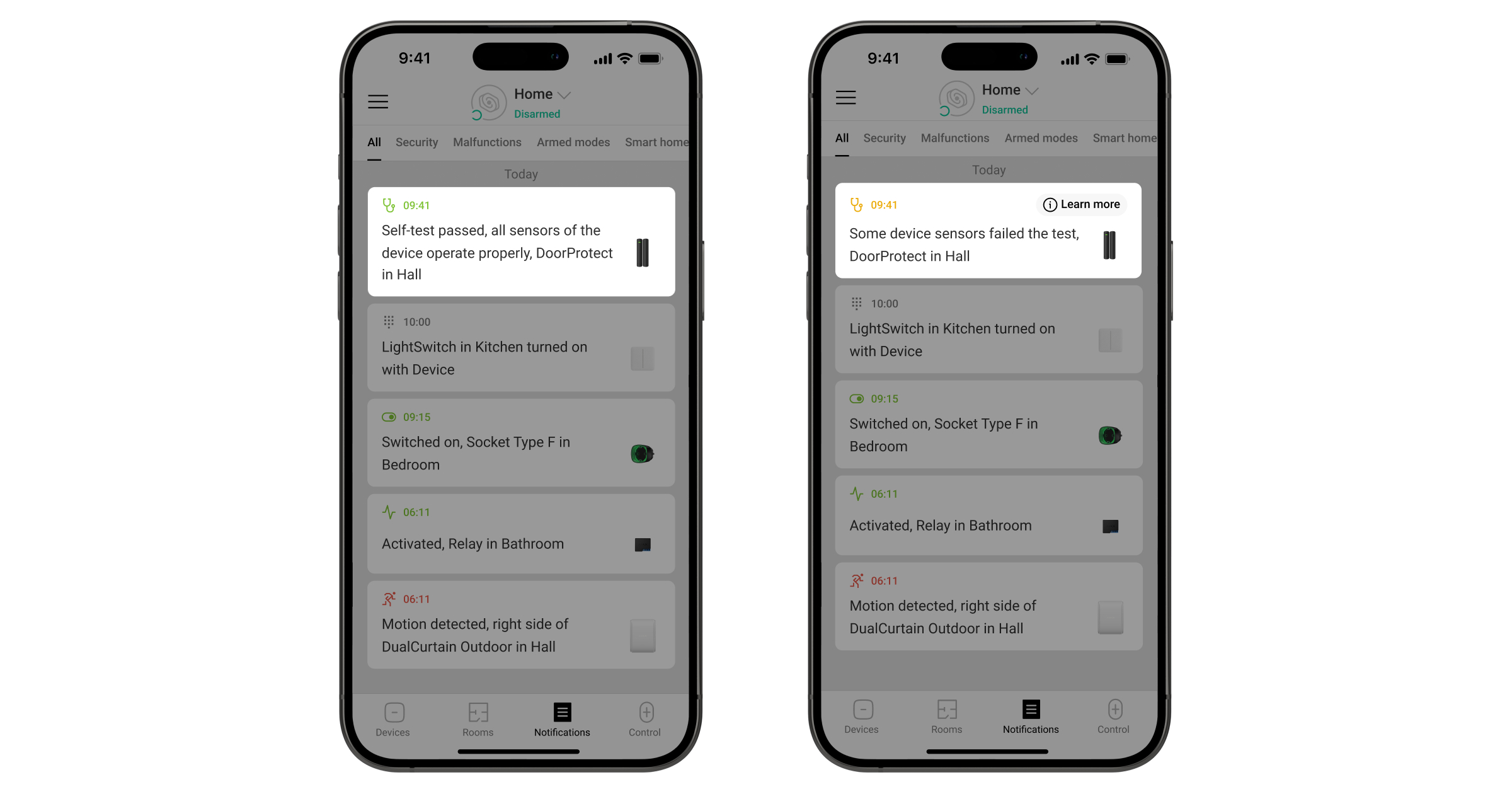
The device self-test allows users to check if the device’s built-in sensors operate properly. During the self-test, the opening sensor, accelerometer, and magnetic sensor are tested.
The self-test of enabled sensors is performed automatically every 24 hours. The magnetic sensor and reed switch (if enabled in the Ajax app) are monitored continuously. The shock and tilt sensors are tested once a day if the detector is armed or operates in the Always active mode.
A self-test can also be run manually from the Ajax app. The remote self-test takes up to 10 seconds, while the automatic self-test does not interrupt the detector’s operation and lasts up to 2 seconds.
To run the self-test, in an Ajax app:
- Go to the Devices tab.
- Select Superior DoorProtect G3 Jeweller in the list.
- Go to Settings .
- Go to the Device self-test menu.
To run the self-test, ensure that the system is disarmed and no other test is running.
- Tap Start.
- If the self-test is successful, tap Done to return to the settings. If some sensors are faulty, we recommend contacting a service center.
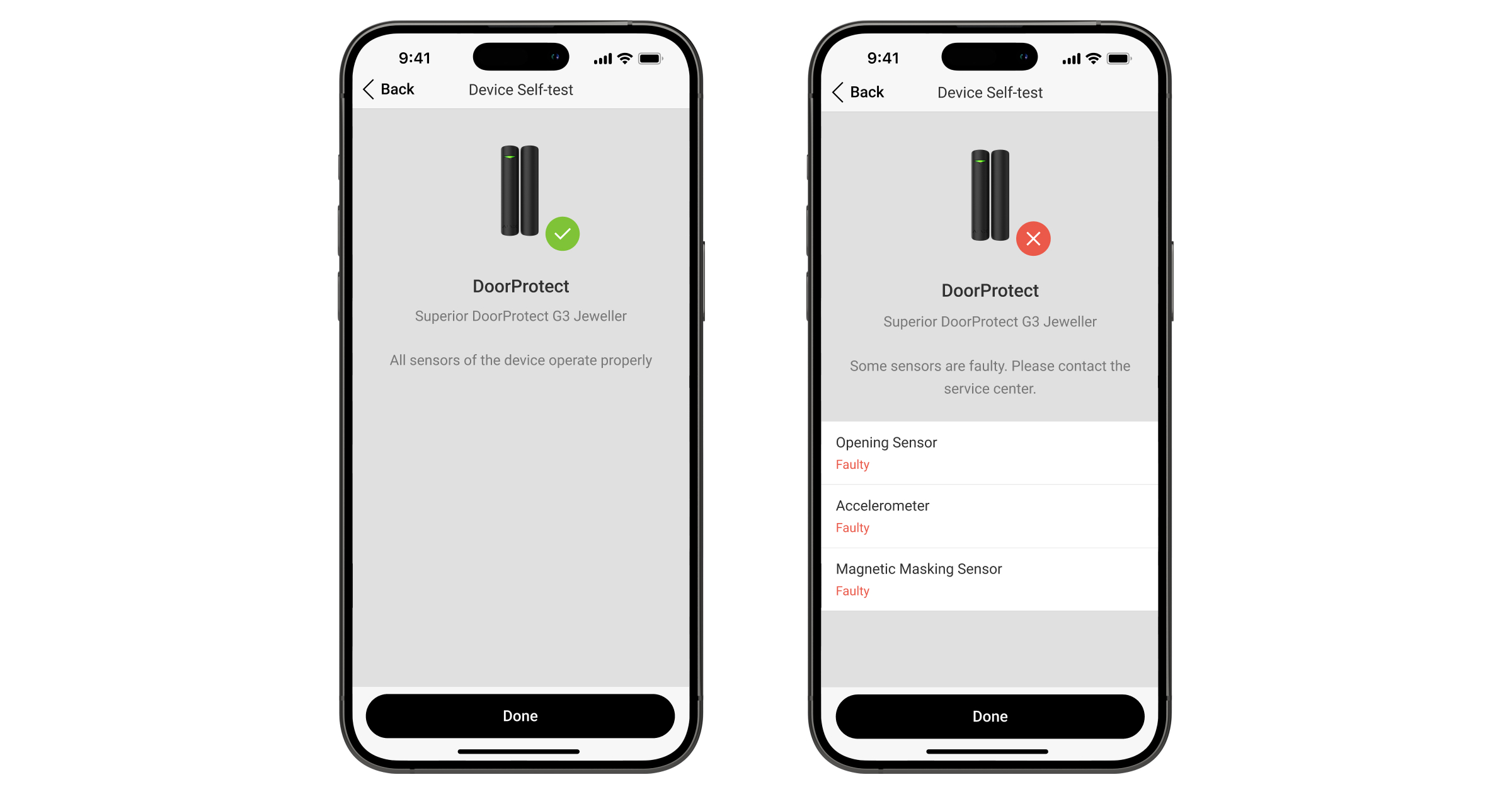
Note that the device self-test checks only the enabled sensors of the device.
If a faulty sensor is disabled, the system will not show the malfunction counter in an Ajax app and will not notify users about the sensor malfunction. However, if a user enables a faulty sensor, the system will send a notification that the sensor is malfunctioning.
Users and the CMS will receive a corresponding notification of the results after the test is completed.
Indication
The Superior DoorProtect G3 Jeweller LED indicator lights up green depending on the device’s state.
| Event | Indication | Note |
| Turning on the device. | Lights up for about 0.5 s. | |
| Turning on the device that has not been added to the hub. | Lights up for about 0.5 s, flashes 6 times, and flashes 3 times rapidly. | |
| Turning off the device. | Lights up for about 1 s, then flashes 3 times. | |
| The device is added to the hub. | Lights up for about 0.5 s. | |
| The device is deleted from the hub. | Flashes six times for 2 s, then flashes three times rapidly after 0.5 s. | |
|
Lights up for about 0.6 s. | The detector signals masking even if the LED alarm indication is turned off. |
| The calibration of the masking sensor was successful. | Flashes rapidly twice. | |
| The battery charge is low. | Slowly lights up green and slowly goes out when the device is triggered. | The battery needs to be replaced. |
| The battery is completely discharged. | Flashes green continuously. | The battery needs to be replaced. |
| There is a device hardware error or sensor malfunction. | Lights up for about 1 s every 4 s. | The device requires maintenance; contact our Technical Support. |
Malfunctions
When the device detects a malfunction (for example, there is no connection via the Jeweller protocol), a malfunction counter is displayed in an Ajax app in the upper left corner of the device icon.
All malfunctions are displayed in the device states. Fields with malfunctions are highlighted in red.
Malfunction is displayed if:
- The detector temperature is beyond the permissible limits.
- The detector lid is open (the tamper button is triggered).
- There is no connection with the hub or radio signal range extender via Jeweller.
- There is no connection with the hub or radio signal range extender via Wings.
- The opening sensor is faulty. Magnetic masking detection is disabled.
- The accelerometer is faulty.
- The magnetic masking sensor is faulty.
- The battery is low.
Maintenance
Regularly check the functioning of the device. The optimal frequency of checks is once every three months. Clean the device enclosure from dust, cobwebs, and other contaminants as they emerge. Use soft, dry wipes suitable for equipment maintenance.
Do not use substances that contain alcohol, acetone, gasoline, and other active solvents to clean the device.
Technical specifications
Warranty
The warranty for the products of the “Ajax Systems Manufacturing” Limited Liability Company is valid for 2 years after purchase.
If the device does not operate properly, we recommend contacting support service first, as most technical issues can be resolved remotely.
Contact Technical Support:
Manufactured by “AS Manufacturing” LLC