Type4 ReX Jeweller is a wireless addressable radio signal range extender for Type4 Hub (4G) Jeweller.
The range extender communicates with a fire alarm central unit via secure Jeweller radio protocol. The communication range is up to 1,800 m in open space. The device is designed for indoor installation.
Type4 ReX Jeweller can operate autonomously for up to 35 hours on the built-in backup battery.
Functional elements
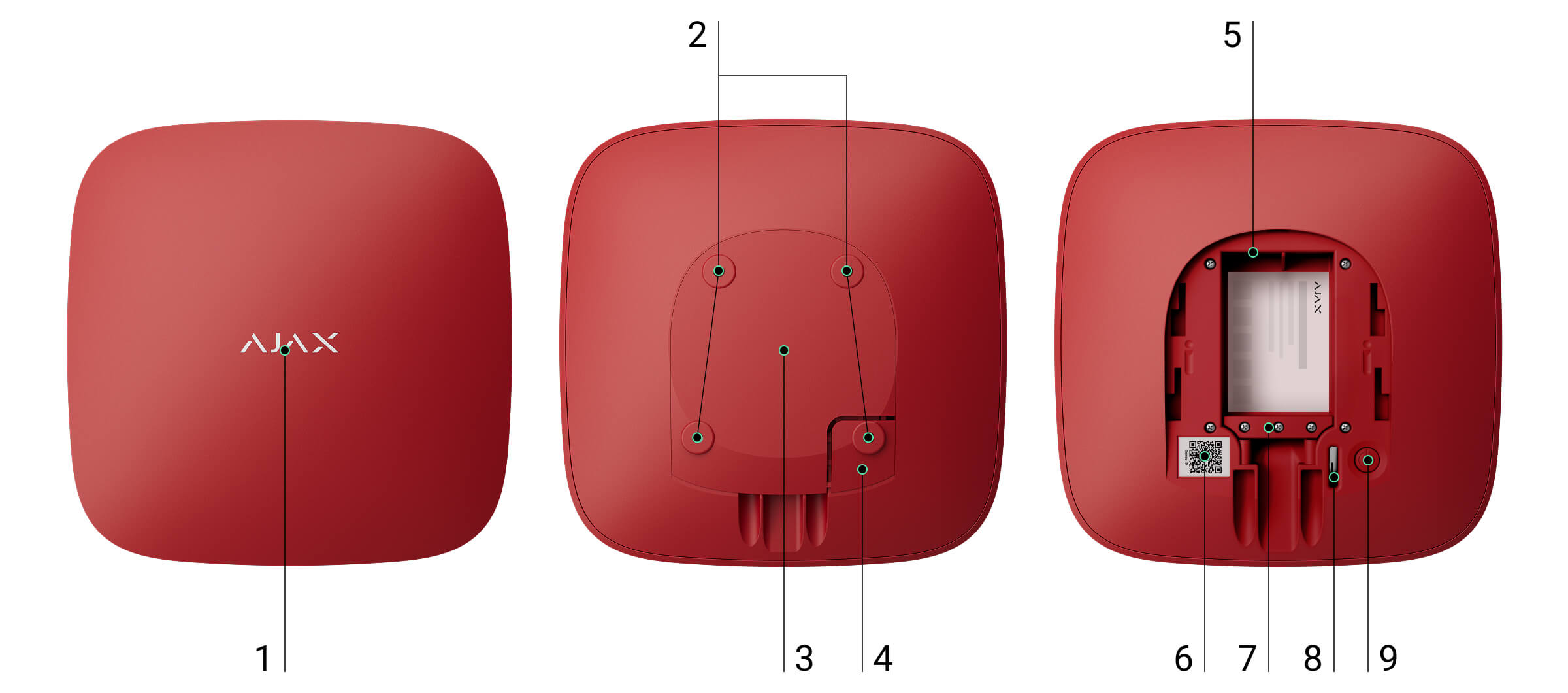
- Logo with an LED indicator.
- Holes to secure the SmartBracket mounting panel to the surface.
- SmartBracket mounting panel. Slide it down to open.
- Perforated part of the mounting panel. It triggers a tamper alarm if someone attempts to detach the device from the surface. Do not break it off.
- Power supply connector.
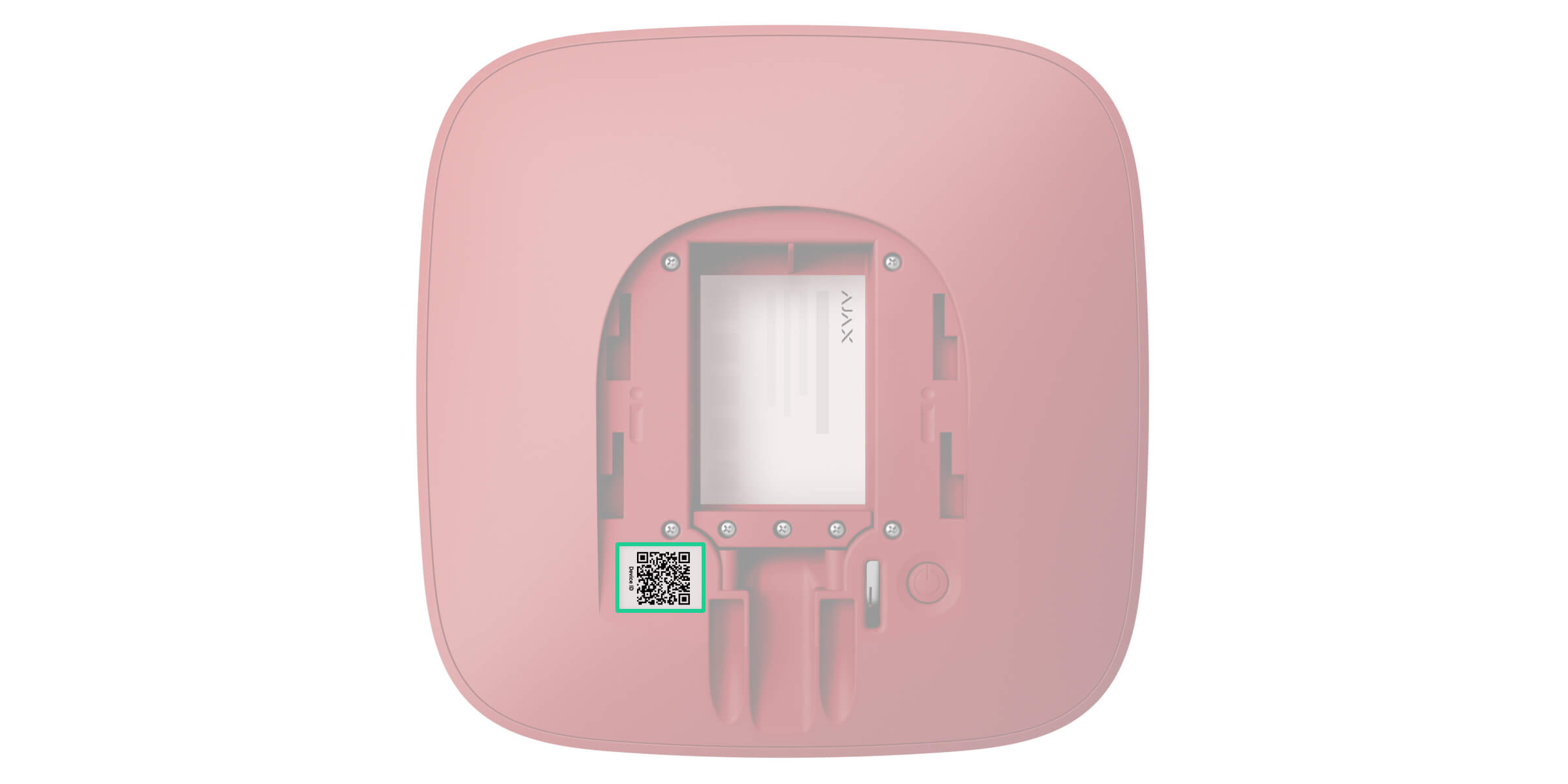
- QR code with the device ID. It is used to add the device to the central unit.
- Сable retainer clamp.
- Tamper button.
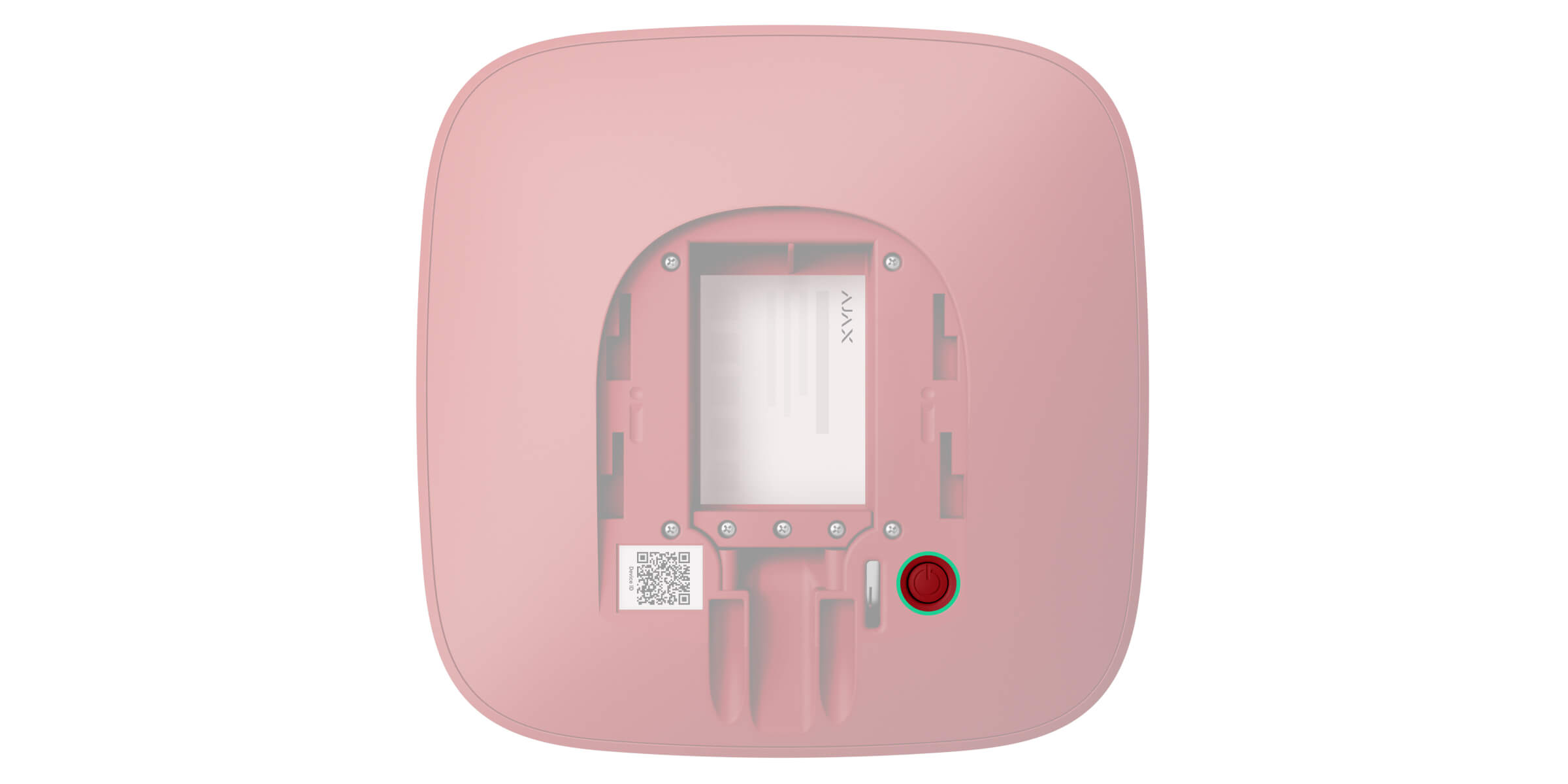
- Power button.
Compatible fire alarm central units
The device requires the Ajax fire alarm central unit with an up-to-date OS Malevich version.
Operating principle
Type4 ReX Jeweller is a wireless addressable radio signal range extender for a fire alarm system. Type4 ReX Jeweller extends the system radio communication range, allowing Ajax devices to be installed at a greater distance from the fire alarm central unit. The range extender communicates with the fire alarm central unit using radio technology — Jeweller protocol.
Type4 ReX Jeweller receives signals from the fire alarm central unit, transmits them to the connected devices, and sends signals from the devices to the fire alarm central unit. The fire alarm central unit polls the range extender with a frequency of 12 to 300 seconds. The polling interval depends on the settings and is 36 seconds by default. Type4 ReX Jeweller polls all connected devices with the same frequency.

Regardless of the settings, all alarm events are delivered in less than 0.3 seconds.
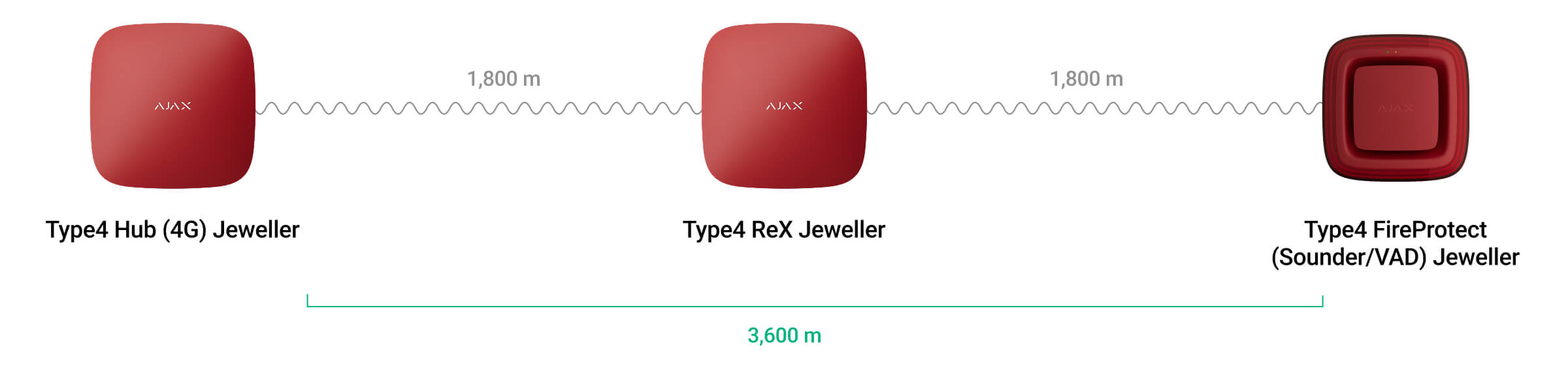
The communication range between Type4 ReX Jeweller and the connected device is limited by the device’s radio signal range. It is provided in the device’s technical specifications available on the website and in the user manual.
If the device loses communication with the range extender, it does not automatically connect to another range extender or fire alarm central unit.
Jeweller communication protocol
The range extender uses Jeweller radio technology to transmit alarms and events. This is a wireless data protocol that provides fast and reliable two-way communication between the fire alarm central unit, the range extender, and system devices connected to the range extender.
To control communication with system devices and view their states, a user or PRO with admin rights can configure the device polling interval from 12 to 300 seconds in an Ajax app.
Number of range extenders and devices that can be added to the system
One range extender can be added to the fire alarm central unit. Type4 ReX Jeweller can only be added to the fire alarm central unit directly. Connection to another range extender is not provided.
Type4 ReX Jeweller does not increase the number of devices added to the fire alarm central unit. The maximum number of devices connected to Type4 ReX Jeweller depends on the fire alarm central unit model.
Sending events to the monitoring station
An Ajax system can transmit alarms to the Ajax PRO Desktop monitoring app and the central monitoring station (CMS) in the formats of SurGard (Contact ID), SIA (DC-09), ADEMCO 685, and other protocols.
Adding to the system
Before adding the device
- Install an Ajax app.
- Log in to your account or create a new one.
- Select a space or create a new one.
- Add at least one virtual room.
- Add a compatible fire alarm central unit to the space. Ensure the fire alarm central unit is switched on and has internet access via Ethernet, Wi-Fi, and/or mobile network.
- Check the states in the Ajax app to ensure the space is disarmed and the fire alarm central unit is not starting an update.

Only a PRO or a space admin with the rights to configure the system may add the device to the fire alarm central unit.
To power Type4 ReX Jeweller:
- Slide the SmartBracket mounting panel down to remove it from the device.
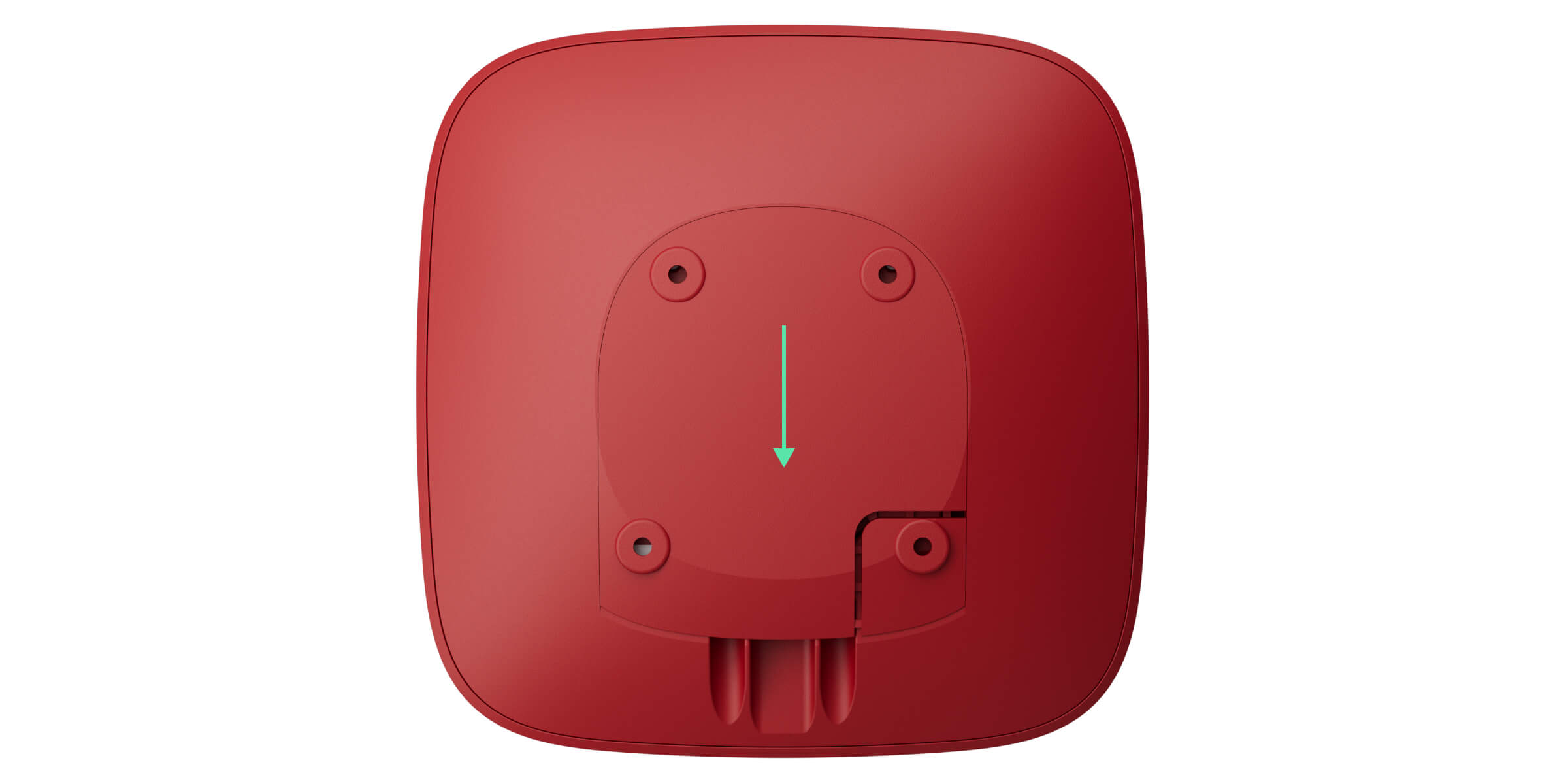
- Connect the power cable to the device’s power supply connector.
- Add the range extender to the system and install it.
Adding the device to the fire alarm central unit
- Open an Ajax app. Select a space to which you want to add the device.
- Go to the Devices
 tab and select Add device.
 - Scan the QR code or enter the device ID manually. A QR code with the ID is placed on the device under the SmartBracket mounting panel. Also, it is duplicated on the device packaging.
- Assign a name to the device.
- Select a fire zone, a virtual room, and a security group (if Group mode is enabled).
- If necessary, specify the device location in the Location field.
- Select Add device, and the countdown will begin.
- Switch on the device by holding the power button for 3 seconds.
Once added to the fire alarm central unit, the device will appear in the list of fire alarm central unit devices in the Ajax app. The update frequency for device states in the list depends on the Jeweller settings and is 36 seconds by default.
If the connection fails, try again in 5 seconds. If the maximum number of devices has already been added to the fire alarm central unit, you will receive an error notification when you try to add more.
Type4 ReX Jeweller works with only one fire alarm central unit. When added to a new fire alarm central unit, it stops sending events to the old one. After the device is added to a new fire alarm central unit, it will not be automatically removed from the device list of the old fire alarm central unit. This must be done through the Ajax app.
Functionality testing
The Ajax system offers several types of tests to help select the correct installation place for the devices. Available for Type4 ReX Jeweller:
- Jeweller signal strength test — to determine the signal strength and stability between the fire alarm central unit and the device via the wireless Jeweller data transfer protocol at the device installation site.
- Signal attenuation test — to decrease or increase the power of the radio transmitter; to check the stability of communication between the device and the fire alarm central unit, the changing environment at the site is simulated.
Connecting devices to Type4 ReX Jeweller
When adding a new device to Type4 ReX Jeweller, ensure it is first added to the fire alarm central unit and only then assigned to the range extender. The device must have a signal strength of at least one bar for communication with the fire alarm central unit and two bars for communication with Type4 ReX Jeweller.
To assign a device to a range extender, in the Ajax app:
- Select the space if you have several of them.
- Go to the Devices tab.
- Select Type4 ReX Jeweller from the list.
- Go to Settings by tapping the gear icon
 in the upper right corner.
 - Select the Pair with device menu.
- Select the devices that should operate via the range extender.
- Tap Back to save the settings.
Once connected, the selected devices are displayed with the icon  in the Ajax app. The device can connect to one Type4 ReX Jeweller only. When the device connects to a new range extender, it automatically disconnects from the old one.
To assign the device to the fire alarm central unit, in the Ajax app:
- Select the space if you have several of them.
- Go to the Devices tab.
- Select Type4 ReX Jeweller from the list.
- Go to Settings by tapping the gear icon in the upper right corner.
- Select the Pair with device menu.
- Uncheck the devices that need to be reconnected to the fire alarm central unit.
- Tap Back to save the settings.
Faults
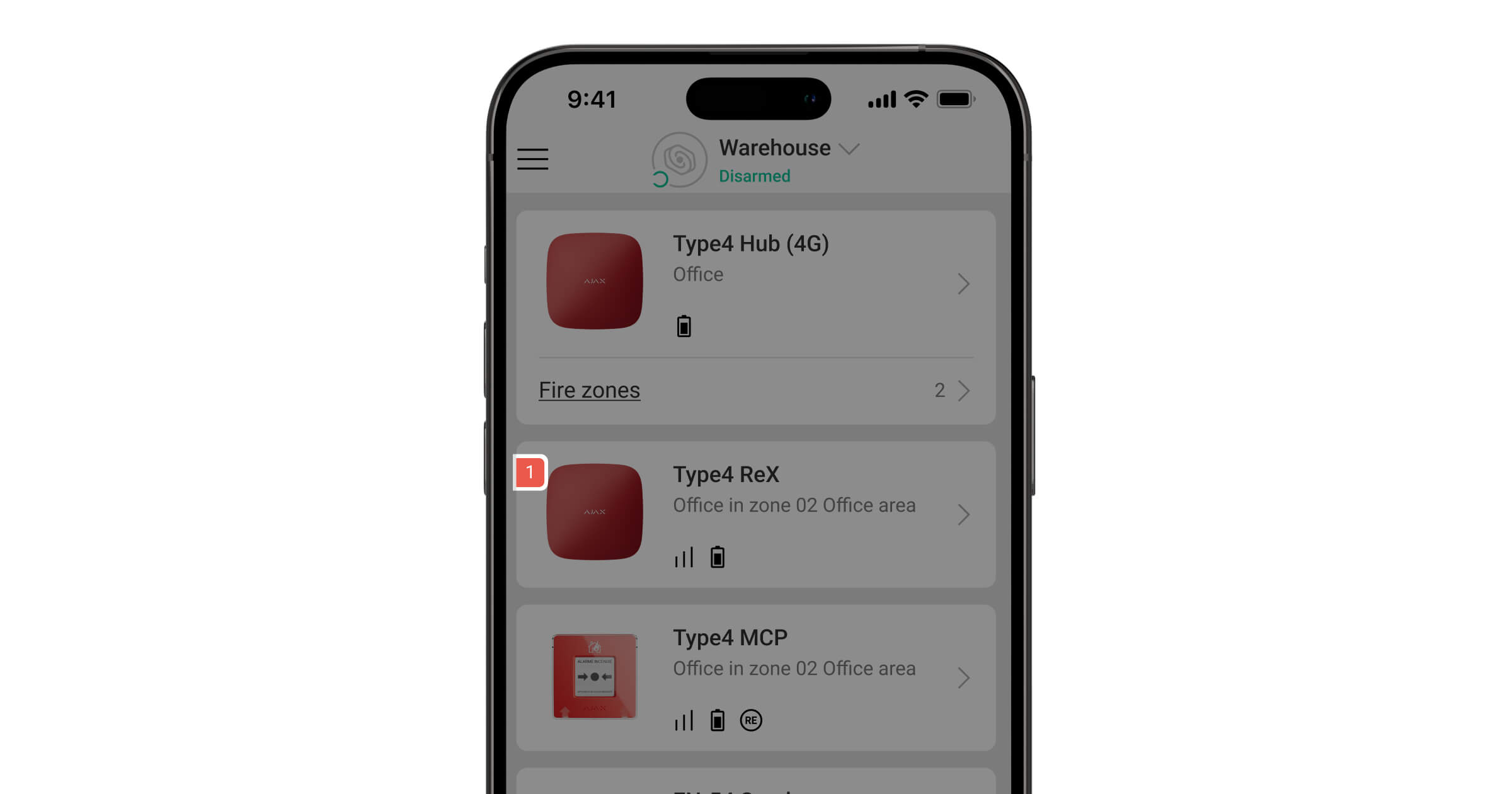
When a range extender fault is detected (e.g., the tamper alarm is triggered, the built-in battery is low, or the device is offline), the Ajax app displays a fault counter on the device icon. Faults are also indicated in the device’s states. Affected fields are highlighted in red.
Full information about the fire alarm system is also available in Ajax apps: Control  tab → Swipe or tap the icon
  .
.
Icons
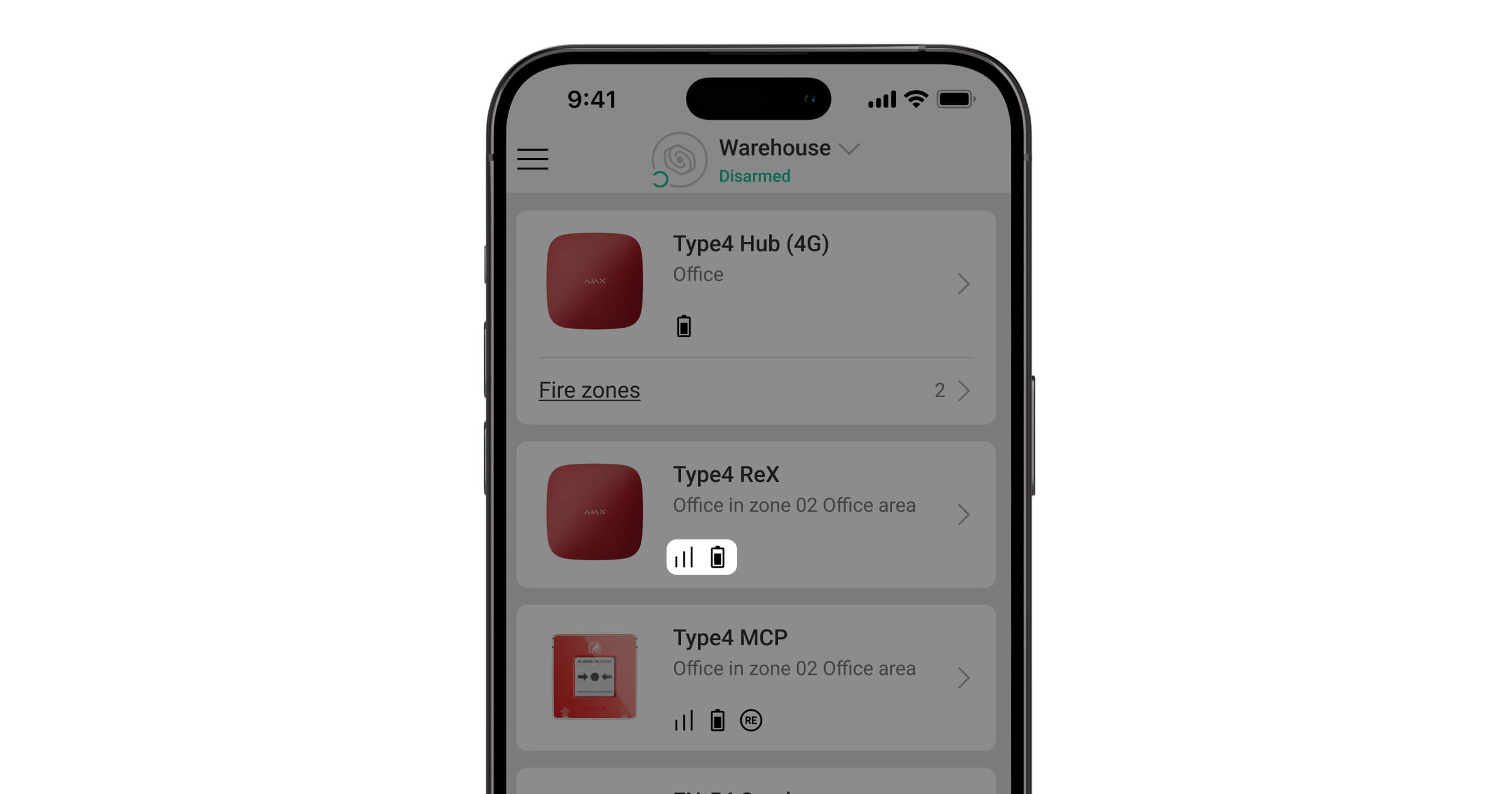
Icons display some of the Type4 ReX Jeweller states. You can view them in the Ajax app, in the Devices tab.
| Icon | Meaning |
 |
Jeweller signal strength. It displays the signal strength between the fire alarm central unit and the device. The recommended value is 3 bars. |
 |
The range extender battery charge level. Displayed in 1% increments. |
 |
The device test is in progress. |
 |
Type4 ReX Jeweller fault detected. Open states for details. |
 |
The device is in the signal attenuation test mode. |
 |
The device is permanently deactivated. |
 |
Tamper alarm notifications are permanently deactivated. |
 |
The device is deactivated until the system is disarmed for the first time. |
 |
Tamper alarm notifications are deactivated until the system is disarmed for the first time. |
 |
The device has lost connection with the fire alarm central unit, or the fire alarm central unit has lost connection with the Ajax Cloud server. |
 |
The device has not been transferred to the new fire alarm central unit. |
States
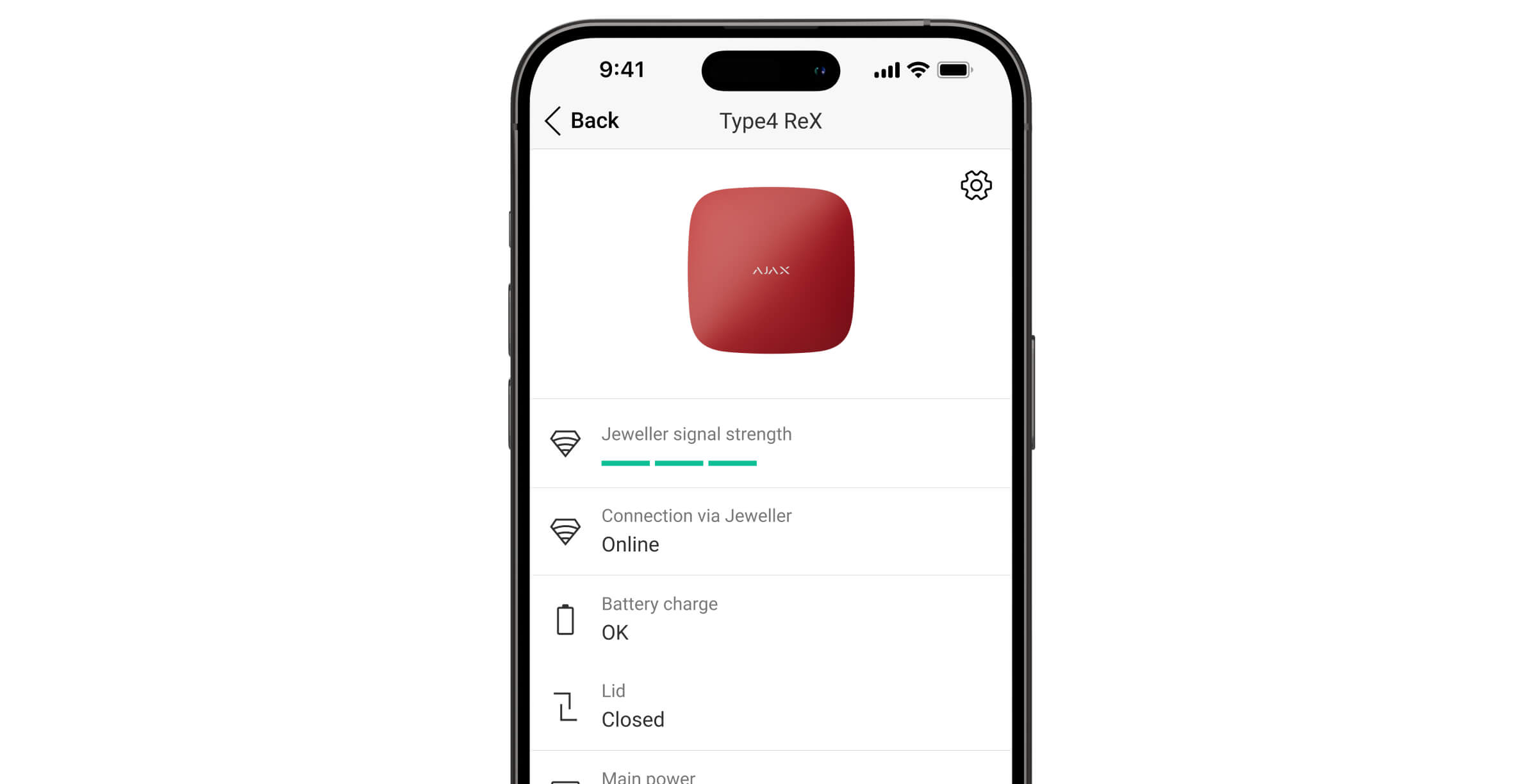
The states include information about the device and its operating parameters. You can find the states of Type4 ReX Jeweller in Ajax apps:
- Go to the Devices tab.
- Select Type4 ReX Jeweller from the list.
| Parameter | Meaning |
| Data import | Displays the error when the data is being transferred to the new fire alarm central unit:
|
| Fault |
The device has a fault. Tapping on The field is displayed only if a fault is detected. |
| Device test |
The device test is in progress. Tapping on |
| Jeweller signal strength |
Jeweller signal strength between Type4 ReX Jeweller and the fire alarm central unit. The recommended value is 3 bars. Jeweller is a protocol for transmitting events and alarms. |
| Connection via Jeweller | The state of the connection via the Jeweller channel between the fire alarm central unit and Type4 ReX Jeweller:
|
| Transmitter power |
Displays the selected power of the transmitter. The parameter appears when the Max or Attenuation option is selected in the Signal attenuation test menu. |
| Battery charge |
Range extender backup battery charge level. Displayed in 1% increments. At a charge level of 20% and below, the system will report low battery charge. |
| Lid | The state of the tamper button that responds to detachment or opening of the device enclosure:
|
| Main power | External power supply connection state:
|
| Permanent deactivation | The state of the device permanent deactivation setting:
|
| One-time deactivation | Shows the state of the device one-time deactivation setting:
|
| Fire zone | Number and name of the fire zone to which the device is assigned. |
| Room | Name of the room to which the device is assigned. |
| Location | Detailed description of the device location. |
| Firmware | Device firmware version. |
| Device ID | The device identifier. It is also available on the QR code on the device enclosure and its packaging. |
| Device No. | The device number. This number is transmitted to a monitoring station in case of an alarm or event. |

Settings
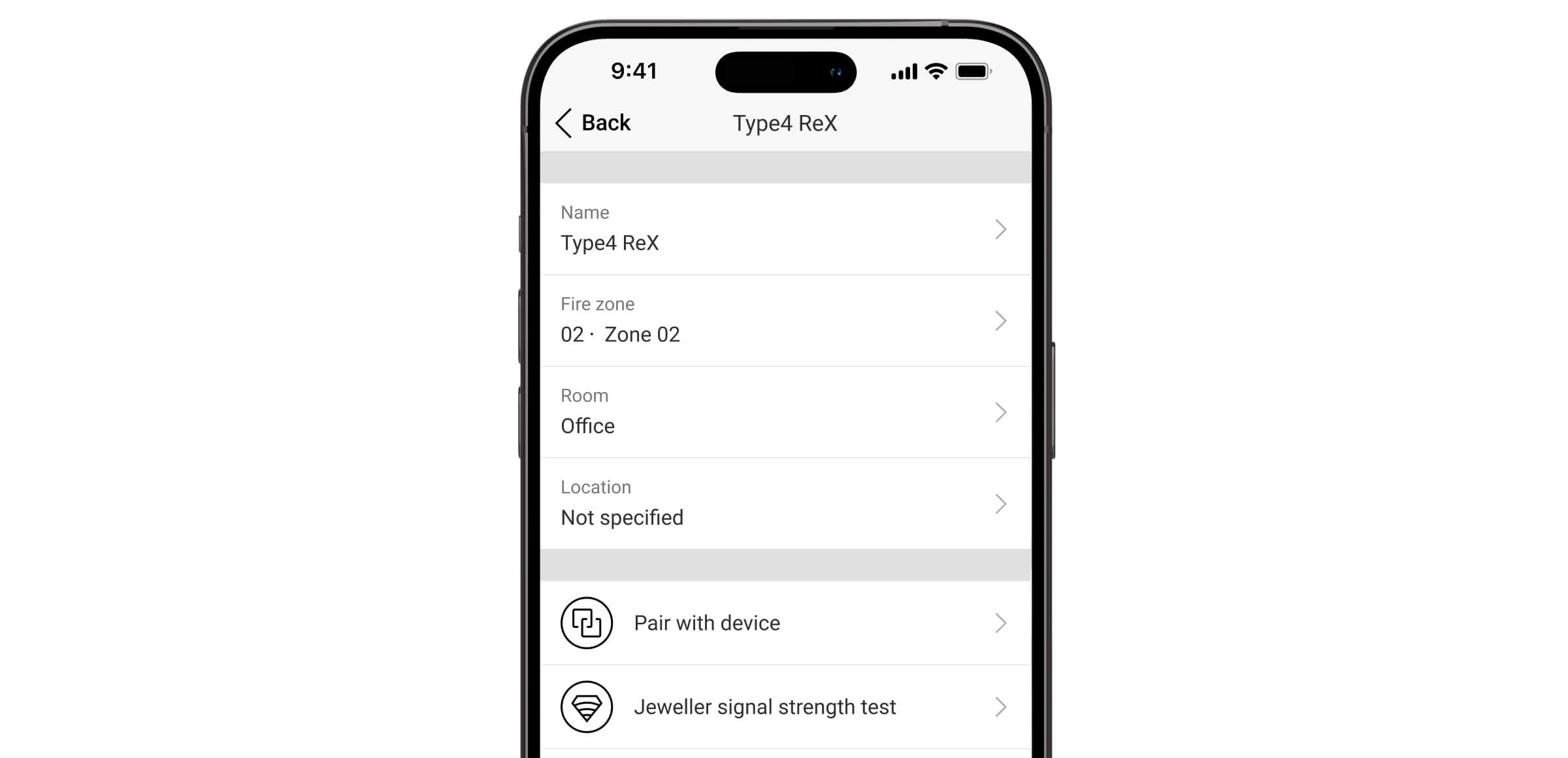
The range extender settings can be changed in Ajax apps. In order to change the settings:
- Log in to the Ajax app.
- Select a facility from the list.
- Go to the Devices tab.
- Select Type4 ReX Jeweller in the list.
- Go to Settings .
- Set the required settings.
- Tap Back to save the new settings.
| Setting | Meaning |
| Name |
Name of the device. It is displayed in the list of fire alarm central unit devices, SMS text, and notifications in the event feed. To change the device name, tap on the text field. The name can contain up to 24 Latin characters or up to 12 Cyrillic characters. |
| Fire zone |
Selecting the fire zone to which Type4 ReX Jeweller is assigned. The fire zone is displayed in the text of SMS and notifications in the event feed. |
| Room |
Selecting the virtual room to which Type4 ReX Jeweller is assigned. The room name is displayed in the text of SMS and notifications in the event feed. |
| Location |
Detailed description of the device location. It is displayed next to the room name in the event feed notifications. The location field can contain up to 24 Latin or Cyrillic characters. |
| Pair with device |
Menu for selecting devices that operate via the range extender. |
| Jeweller signal strength test |
Switching the device to the Jeweller signal strength test mode. The test allows you to check the signal strength between the fire alarm central unit and the range extender via the wireless Jeweller data transfer protocol to select the optimal installation site. |
| Signal attenuation test |
Switches the device to the signal attenuation test mode. |
| User manual | Opening the Type4 ReX Jeweller user manual in an Ajax app. |
| Permanent deactivation |
The setting allows a user to disable device events without removing it from the system. Three options are available:
The system will only ignore the disabled device. The devices connected via Type4 ReX Jeweller will continue to operate normally. |
| One-time deactivation |
The setting allows a user to disable device events before the system is first disarmed. Three options are available:
The system will only ignore the disabled device. The devices connected via Type4 ReX Jeweller will continue to operate normally. |
| Delete device | Unpairing the device, disconnecting it from the fire alarm central unit, and deleting its settings. |
Indication
The Type4 ReX Jeweller LED indicator can light up depending on the device state.
| Event | Indication | Note |
| Connection with the central unit is established. | Lights up white. | If the external power supply is off, the indicator will flash every 10 seconds. |
| No connection with the central unit. | Lights up red. | If the external power supply is off, the indicator will flash every 10 seconds. |
| The external power supply is disconnected. | Lights up for 3 minutes, then flashes every 10 seconds. | The indication color depends on whether a connection to the central unit is present. |
| Jeweller signal strength test is in progress. | The indication depends on the signal strength:
|
Selecting the installation site
When choosing where to place Type4 ReX Jeweller, consider the parameters that affect its operation:
- Jeweller signal strength.
- The distance between the device and the fire alarm central unit.
Install the range extender on a vertical surface. This will ensure proper tamper button response if someone attempts to remove the device.
Consider the signal strength between the fire alarm central unit and the range extender, as well as between the range extender and all devices connected to it.
Locate Type4 ReX Jeweller in a place with a stable Jeweller signal strength (3 bars in the Ajax app). When choosing an installation location, consider the distance between the range extender and the fire alarm central unit. You should also check if there are any obstacles between the devices that could interfere with the radio signal, such as walls, intermediate floors, or large objects.
Type4 ReX Jeweller should be placed between the fire alarm central unit and a device with a weak signal. The range extender does not amplify the radio signal, so installing it near the fire alarm central unit or a device with a signal level of 1 or 0 bars will not produce the desired result. To comply with Type 4 requirements, the signal strength between the device and the fire alarm central unit must be at least two bars. Our Radio communication range calculator will help you roughly calculate the signal level at the installation site.
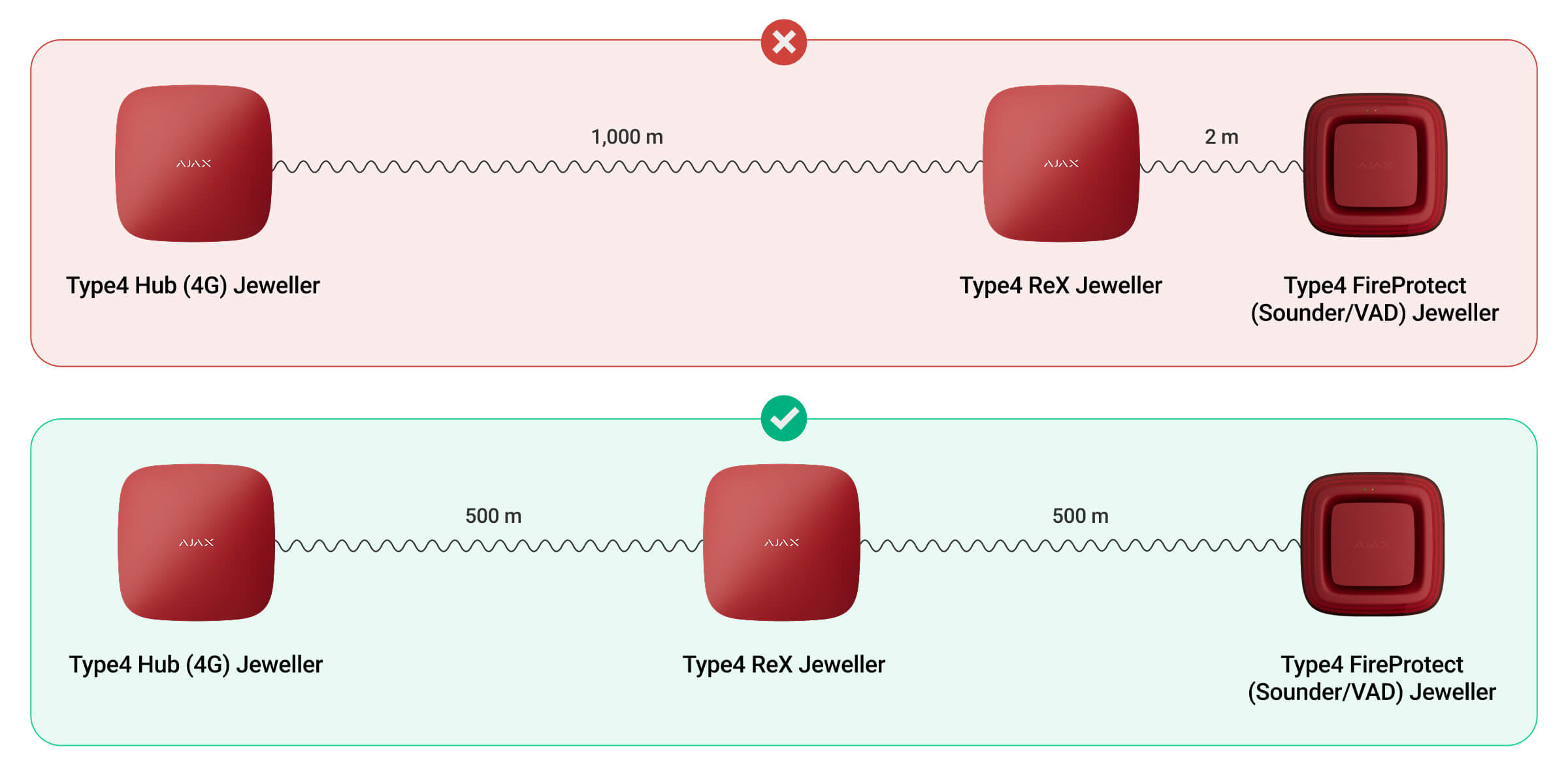
Check the Jeweller signal strength at the installation site. If the signal strength is low (a single bar), we cannot guarantee the stable operation of the system. At the very least, relocate the device as repositioning even by 20 cm can significantly improve the signal reception.
Installations must comply with local regulations and codes of practice.
Type4 ReX Jeweller should be hidden from direct view. This will help reduce the likelihood of sabotage or jamming. Also, keep in mind that the device is intended for indoor installation only.
Where not to install Type4 ReX Jeweller
- Outdoors. This could damage the device.
- Near the metal objects and mirrors. They can cause attenuation or shielding of the radio signal. This could result in the loss of connection between the range extender, the fire alarm central unit, and Ajax devices.
- In places with high levels of radio interference. This could result in the loss of connection between the range extender, the fire alarm central unit, and wireless Ajax devices or false notifications about system jamming.
- Inside premises with temperature and humidity beyond the permissible limits. This could result in a failure of the range extender.
- Less than 1 meter away from the router and power cables. This could result in the loss of connection between the range extender, the fire alarm central unit, and wireless devices.
- Less than 1 meter away from devices. This could result in the loss of connection between the range extender, the fire alarm central unit, and wireless devices.
- In places with low or unstable signal strength. This could result in the loss of connection with the fire alarm central unit or devices connected to the range extender.
Installation
During installation and operation of the Ajax system, adhere to the rules and requirements of regulatory legal acts on electrical safety. Do not disassemble the device while it is energized or use it with a damaged power cable. Observe the safety procedures and the rules for electrical installation work when connecting the range extender.
Before installing Type4 ReX Jeweller make sure that you have selected the optimal location and that it meets the requirements of this manual.
To install Type4 ReX Jeweller:
- Slide the SmartBracket mounting panel down to remove it from the device.
- Connect the power cable to the device’s power supply connector.
- Secure the power cable with the supplied cable retainer clamp and screws. The cable retainer clamp must fit tightly to the cable so that the device lid closes easily. This will reduce the likelihood of sabotage, as it takes a lot more to tear away a secured cable.
- Add the device to the system.
- Temporarily secure the SmartBracket panel using double-sided adhesive tape or other temporary fasteners.
Use the range extender with RX.T4.J-000-EU SmartBracket mounting panel only.
Double-sided adhesive tape should only be used for temporary installation. The device attached with the tape may come unstuck at any time. As long as the device is secured with the double-sided adhesive tape, the tamper button will not be triggered when the device is detached from the surface.
- Place the device on the SmartBracket mounting panel.
- Perform the functionality testing.
- If the tests are successful, remove the device from SmartBracket.
- Secure the SmartBracket panel to the surface with bundled screws. Use all fixing points.
If you use other fasteners, ensure they do not damage or deform the panel.
- Place the device on the SmartBracket mounting panel.
- Tighten the holding screws on the bottom of the device enclosure. The screws are needed for more reliable fastening and to protect the device from quick dismantling.
Maintenance
Check the functioning of Type4 ReX Jeweller and connected devices on a regular basis. The optimal frequency of checks is once every three months. Clean the device enclosure from dust, cobwebs, and other contaminants as they emerge. Use a soft, dry cloth that is suitable for equipment care.
Do not use substances that contain alcohol, acetone, petrol, or other active solvents to clean the device.
Warranty
Warranty for the Limited Liability Company “Ajax Systems Manufacturing” products is valid for 2 years after the purchase.
If the device does not operate properly, we recommend contacting Ajax Technical Support first. In most cases, technical issues can be resolved remotely.
Contact Technical Support:
Manufactured by “AS Manufacturing” LLC