
Internal battery RB (6.4V/78Ah) is a rechargeable lithium iron phosphate (LiFePO4) battery for powering the compatible hub.
Functional elements
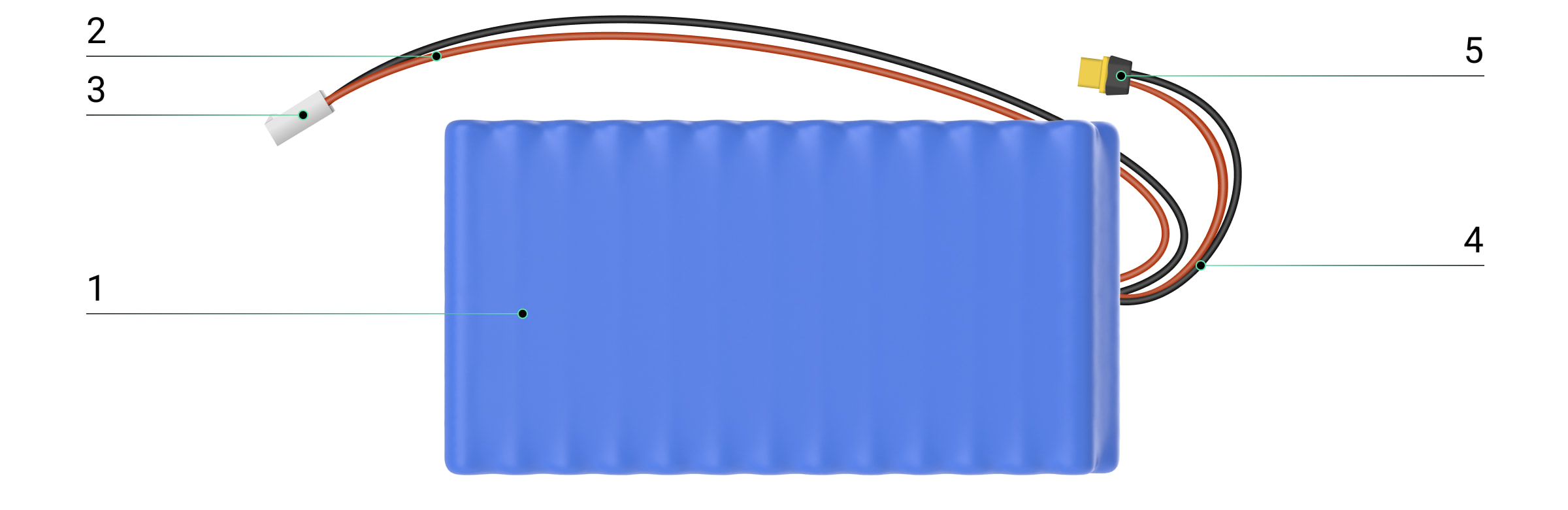
- Battery.
- Cable for connecting the battery to the hub.
- Connector for attaching the battery to the hub.
- Charging cable.
- Battery charging connector.
Compatible hubs
A compatible Ajax hub is required for the battery to operate.
Operating principle
Internal battery RB (6.4V/78Ah) is an internal rechargeable battery used to power Hub BP Jeweller (without casing). It can energize the hub both independently and as a backup power source when an external battery is used.
Selecting an installation site
When choosing an installation location, consider the factors that affect the battery operation:
- Operating temperature range.
- Permissible humidity level.
When the battery is not in use, storage temperature and humidity must comply with the permissible levels specified for the battery.

To extend the battery life, enable the Battery power saver mode.
The battery must be installed in a compatible Ajax casing.
Consider the placement recommendations when designing your Ajax system. Only professionals may design and install the security system. The list of recommended Ajax partners is available here.
Where not to install the battery
- In places with high temperatures. For example, near heat sources, such as radiators, heaters, direct sunlight, etc. High temperatures may result in battery overheating, rapid self-discharge, damage to its components, or explosion and fire.
- In places with high humidity. Moisture may corrode the contacts or cause a short circuit.
- Near flammable materials. Never place the battery near flammable liquids or materials. Doing so increases the risk of fire or explosion, especially if a short circuit occurs.
- In the Hub BP Jeweller casing.
Preparing for installation
Before installing Internal battery RB (6.4V/78Ah), ensure it is compatible with the hub. Also, read this manual and the hub user guide.
User manuals for Ajax hubs and other devices can be found on the Ajax Support page.
Do not deviate from the approved system design. Violating the basic installation rules and the recommendations in this manual may cause the battery to operate incorrectly.
Cable arrangement
When preparing to route cables, read and strictly follow the electrical and fire safety regulations in your region.
Installation and configuration
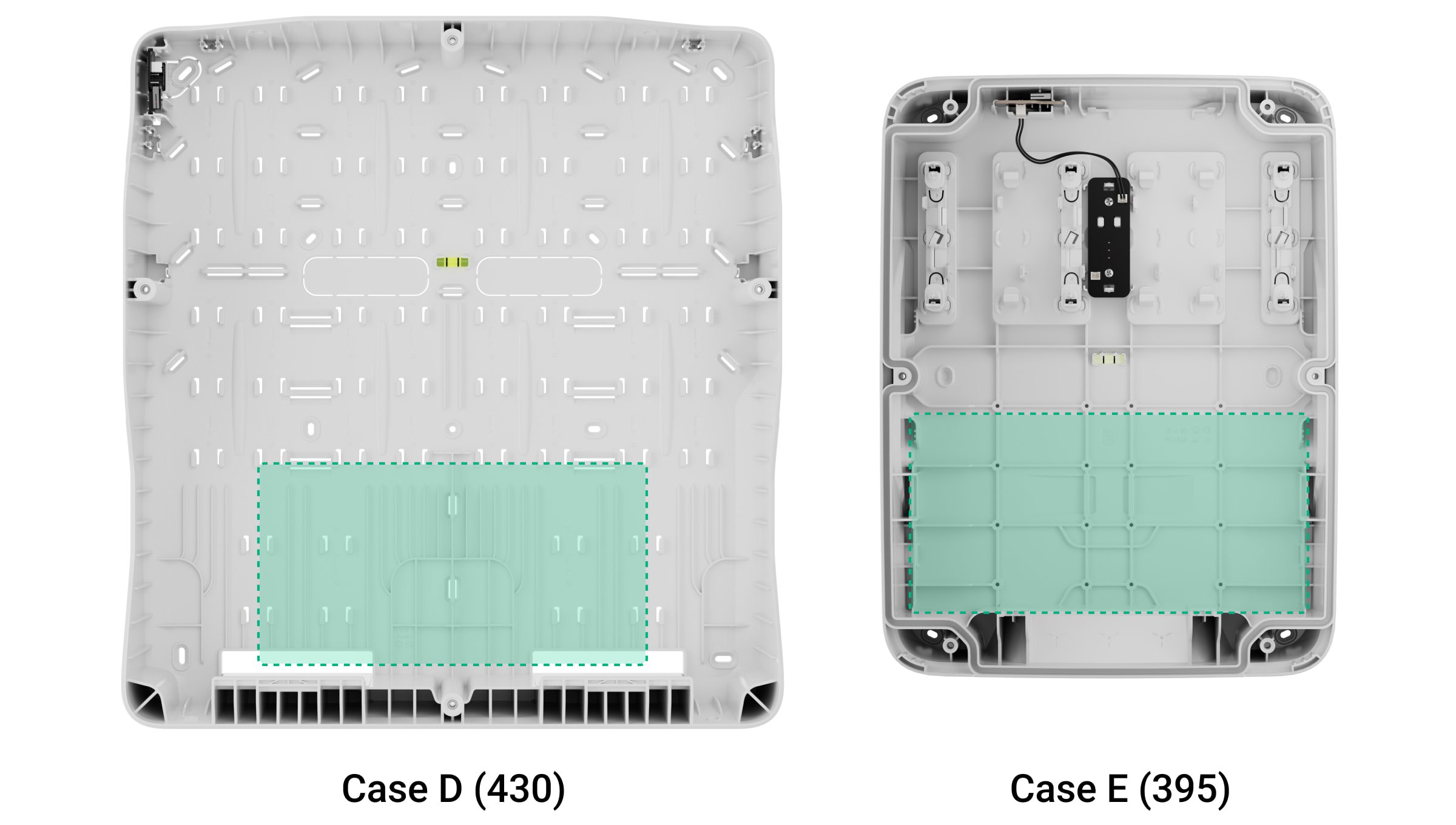
Before installation, ensure that you have selected the optimal location that meets the requirements in this manual. The battery must be installed into Case E (395) (coming soon) or Case D (430), which are sold separately.
Only a professional electrician may install the battery.
Installing the battery in the casing

Before installing the battery, read the user manuals of the compatible hub and Ajax Case. This will help you install the battery correctly and configure the hub settings.
- Remove the casing lid.
- Turn off the hub.
- Install the battery in the compatible Ajax Case.
- Locate the internal battery connector on the board.
- Connect the battery to the board connector.
Observe the polarity. If the battery is connected incorrectly, it will not power the hub, and the connector can be damaged.
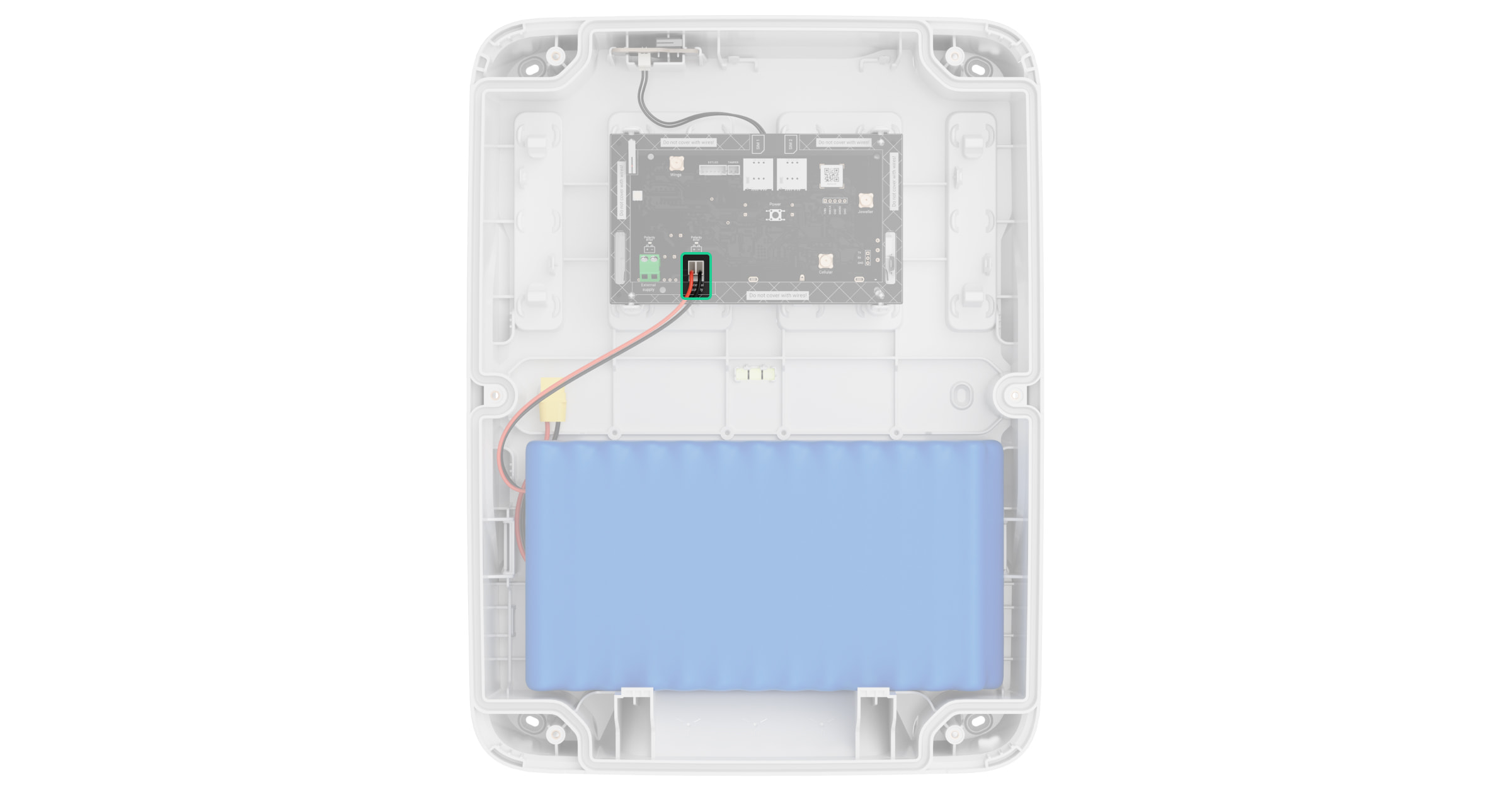
The battery cable should not lie on or under the hub board, as this may impair communication between the hub and connected devices.
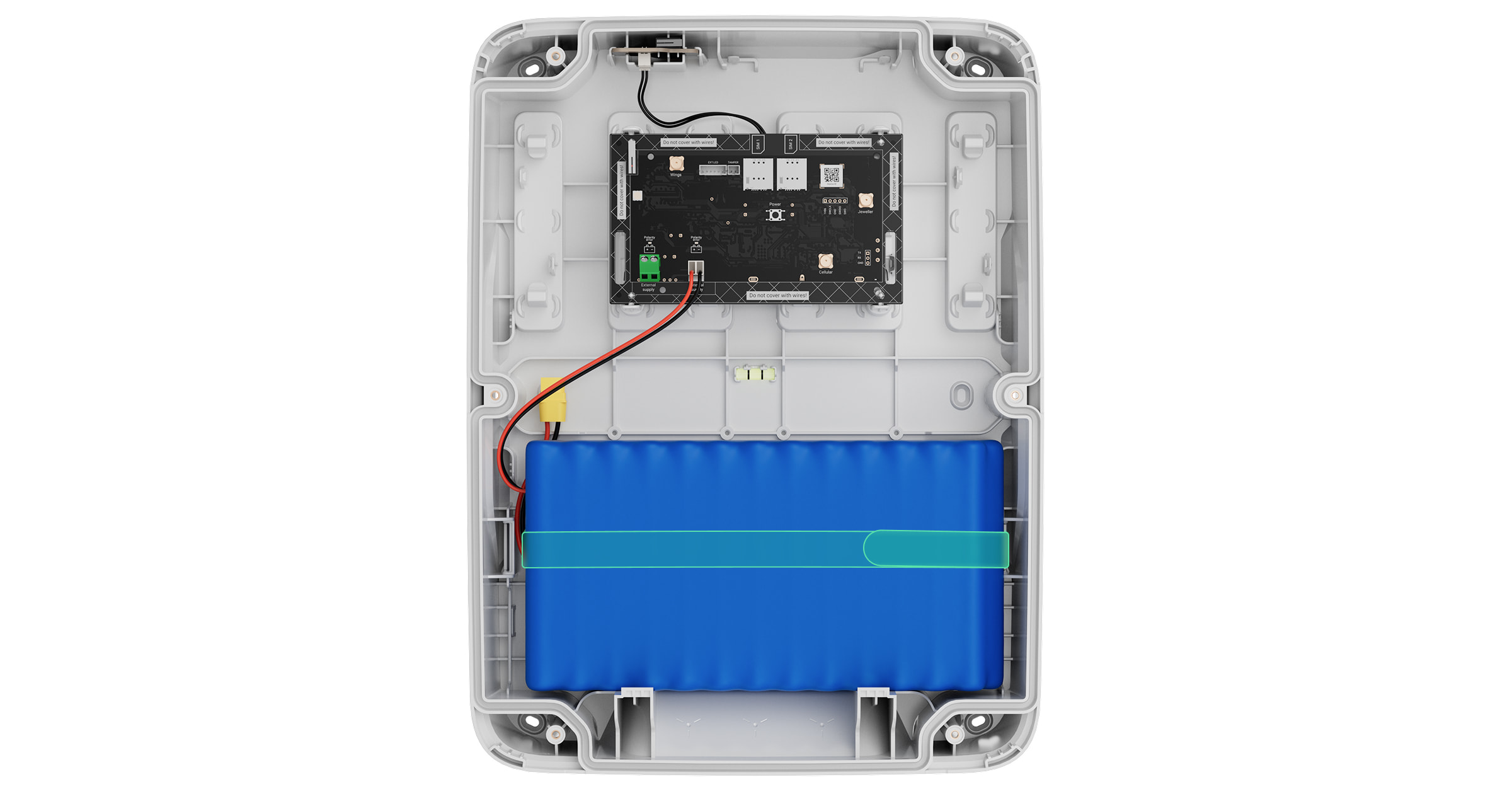
- Secure the battery in the casing with the hook-and-loop fastener (included in the Case D (430) and Case E (395) complete sets). Do not tighten the fastener too much, as this may damage the board and cell contacts inside the battery.
- Turn on the hub.
- Close the casing lid.
- Select the battery type in the hub settings.
- Check the battery connection state in an Ajax app.
Configuring the battery
After installing the battery, select the correct hub settings in the Ajax PRO app.
- Select the required space or object.
- Go to the Devices
 tab.
tab. - Select the hub from the list.
- Go to its Settings
 .
. - Go to the Service menu.
- Go to the Battery settings menu.
- Select the Rechargeable lithium battery option for the Internal battery type setting.
- Configure other battery settings if necessary.
- Tap Back to save the settings.
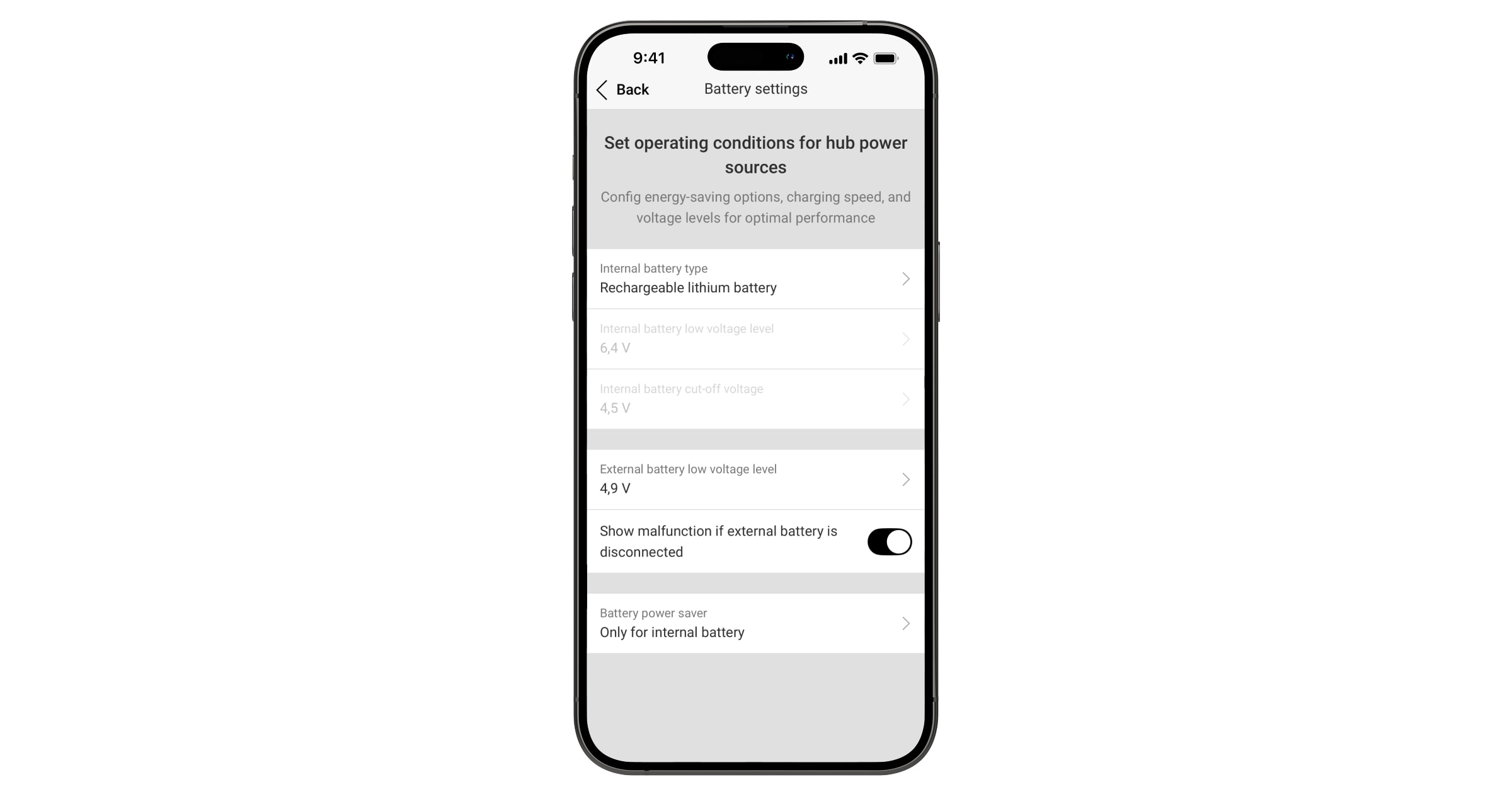
States
The hub states include information about the battery connection status. They can be found in Ajax apps:
- Go to the Devices tab.
- Select the hub from the list.
Maintenance
Internal battery RB (6.4V/78Ah) is rechargeable and maintenance-free.
Recommended battery chargers
Before using the battery charger, carefully read the manufacturer’s instructions. They contain guidance on safe use and recommended parameters.
The complete set includes a cable adapter for connecting the battery to the charger.
When charging the battery, use the temperature sensor recommended by the manufacturer of the corresponding charger.
List of recommended battery chargers for Internal battery RB (6.4V/78Ah)
| Manufacturer | Model | Full battery charge time | Notes |
| SkyRC | Ultimate Duo 400W | 7 hours | Supports simultaneous charging of two batteries. |
| SkyRC | iMAX B6mini | 16 hours | |
| SkyRC | iMAX B6AC V2 | 16 hours | |
| ToolkitRC | M6DAC | 7 hours | Supports simultaneous charging of two batteries. |
| HTRC | T240 DUO | 10 hours | Supports simultaneous charging of two batteries. |
| EV-PEAK | C1-XR | 10 hours | |
| Hitec | RDX1 Mini | 7 hours |
If the battery has been fully discharged by the hub, some chargers (for example, Ultimate Duo 400W) may not detect it immediately. In this case, apply a short pre-charge (e.g., 7.2 V with a current limit of 100 mA for about 10 seconds) to restore normal operation.
Charging profile and recommended parameters for the battery charger
| Parameter | Value |
| Battery type | LiFePO4 |
| Maximum charge current | 15 A |
| TVC (Terminal Voltage Control) | 7.2 V⎓ (3.6 V⎓ per cell) |
| Temperature cutoff | 113 °F |
| Cell configuration | 2S |
Storage conditions
The battery should be stored in a cool, dry, and well-ventilated place at a temperature not exceeding 113 °F. The battery should be charged to about 30–50% of its capacity. These conditions are necessary to reduce battery degradation.
To prevent capacity loss due to overdischarge, recharge the battery no later than 6 months from the QA date indicated on the packaging sticker (MM.YYYY).